
Automations & Rule Engine
Intelligent review routing rules, AI auto-replies with approvals, and scheduled reports. Priority-ordered rules with full execution run logs.
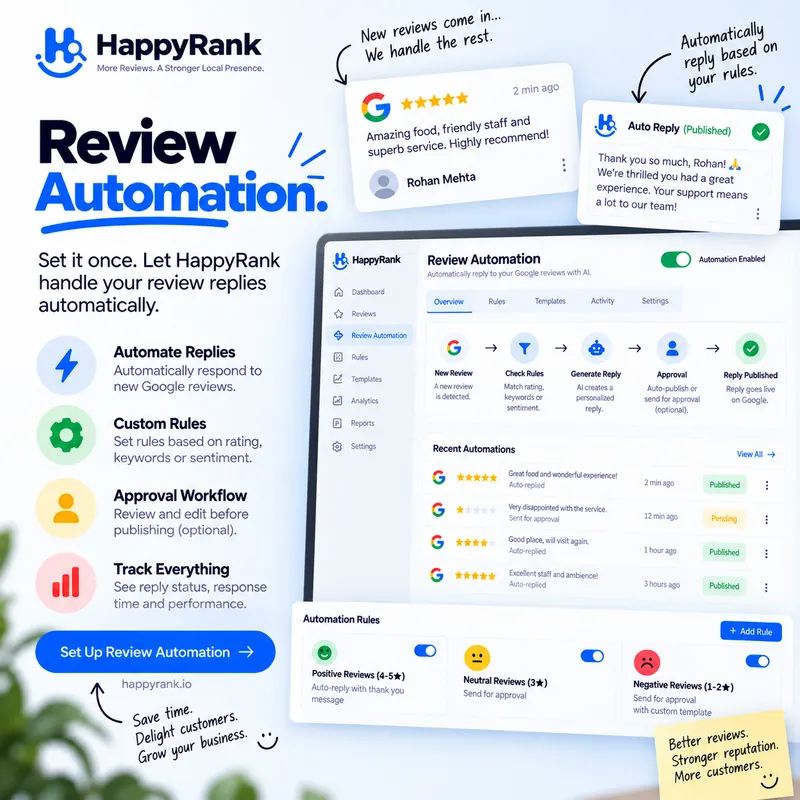
Why Teams Choose Happy Rank Automations & Rule Engine
Trigger-Based Rules
Run on new reviews or overdue unanswered reviews, with rating, urgency, and reply-status conditions evaluated in priority order.
Draft-First AI Replies
GENERATE_AI_REPLY drafts a reply and REQUIRE_APPROVAL holds it for human review. Auto-publish stays off unless you explicitly enable it per rule.
Auditable Execution
Every run is logged with success/failed steps, duplicate-notification suppression, and loop protection — retry or inspect any step.
Review volume breaks manual processes. At five reviews a week, an owner can personally read and answer everything; at fifty, across six locations, with staff turnover and weekends, the same care requires machinery. Automations supply that machinery as intelligent rules: when a new review arrives or an old one goes overdue, matching rules evaluate their conditions in priority order and execute chained actions — drafting AI replies, creating action items, notifying the team, holding for approval. Deterministic, logged, and safe by default.
The safety posture is the headline. Draft-first generation with mandatory human approval is the default; automatic publishing exists only as an explicit per-rule opt-in, and the engine actively strips auto-publish steps whenever an approval step is present. Duplicate notifications collapse, runaway loops are detected and halted, and every execution leaves a step-by-step log. This guide explains triggers, conditions, actions, templates, and the guardrails that let teams scale response without scaling risk.
Triggers: the events rules listen for
Two trigger types cover the reputation lifecycle. New-review triggers fire the moment a fresh review lands, enabling the fastest possible response — the critical-review alert reaching a manager within minutes, the five-star praise getting its appreciation draft the same hour. Review-overdue triggers fire when a review sits unanswered past its window, catching whatever the humans missed: the weekend pile-up, the location nobody checked, the reply someone meant to write.
The pair forms a complete safety net with complementary psychology. New-review rules optimize speed and appropriateness of the first touch; overdue rules guarantee nothing ages into embarrassment regardless of staffing chaos. Together they mean every review meets either immediate handling or a scheduled backstop — the coverage matrix single-trigger systems cannot provide.
Choosing trigger coverage per location
High-volume locations need both triggers active with tight overdue windows, because their risk is drowning. Low-volume locations can run longer overdue windows, because their risk is a single visible gap festering for weeks. Seasonal businesses should tighten both ahead of peak periods when review velocity spikes and staffing stretches thinnest.
Agencies standardize the pair as the baseline for every client, then customize conditions per account. The triggers rarely change; the rating thresholds, urgency filters, and action chains carry the per-client variation. Standard skeleton, custom flesh — auditable everywhere.
Conditions and priority: which rules win
Rules evaluate conditions on rating, urgency signals, and reply status, combined with all-or-any logic: every condition must hold, or at least one. A critical-care rule might fire on low ratings or critical urgency flags; a fast-track praise rule requires high ratings across the board. Empty conditions mean the rule applies to all incoming reviews — useful for catch-all logging, dangerous for publishing, which is why publishing always pairs with narrow conditions.
When several rules match one review, priority decides the order deterministically — highest first — rather than racing or merging unpredictably. The engine then consolidates actions across matched rules, which is where the subtle protections live: duplicate notification actions collapse to one, and conflicting publish-versus-approval directives resolve conservatively toward human review. Determinism means the same review always produces the same handling, which is what makes the system debuggable and trustworthy.
Designing non-overlapping rule sets
Segment by rating bands with clear boundaries: critical low ratings to managers with empathetic drafts, middle ratings to experienced staff with careful drafts, high ratings to fast-track appreciation. Overlaps at boundaries are resolved by priority, but clean bands make behavior explainable to the team and to clients asking why a review was handled a certain way.
Review the set quarterly against actual traffic. Rules that never fire are either misconfigured or guarding against scenarios that never occur — prune or retune them. Rules that fire constantly need narrower conditions or more capacity behind them. A rule set is a living roster, not a monument.
Actions: what rules actually do
Five action types compose every playbook. Generate-AI-reply drafts the response and stores it as an unposted draft on the review. Require-approval marks the work pending human review — the gate everything passes through by default. Publish-reply posts an approved draft to Google, but only when the rule explicitly enables auto-publishing. Create-action raises a prioritized item in the Action Center with a title and severity. Send-notification alerts the team through the notification pipeline with deduplication across rules.
Chaining gives the actions their power. The classic critical-review chain — create the action item, notify the manager, draft the empathetic reply, require approval — moves a crisis from detection to assigned, drafted, and awaiting a decision in seconds, with humans entering exactly where judgment lives. Positive fast-tracks chain a single grateful draft, because praise needs speed more than ceremony.
The approval gate and the auto-publish opt-in
Require-approval is the default conservative posture for a reason: public words carry reputation risk no efficiency gain justifies taking blindly. The engine enforces this structurally — any rule containing an approval step has publish steps stripped from its consolidated actions, so contradictory configurations fail safe rather than failing loud. Auto-publishing additionally demands its own explicit per-rule toggle; there is no global switch to accidentally flip.
Enable auto-publish only where the blast radius is tiny and the drafts are proven: high-rating praise with months of good drafts, low-risk segments, locations with instant human monitoring. Everything else stays approval-gated. The ten seconds a human spends approving buys immunity from the entire category of automation disasters.
Starter templates that encode best practice
New workspaces begin with three templates embodying the standard playbook. The critical-review alert watches for low ratings or critical urgency, then assigns to management, notifies urgently, drafts an empathetic professional reply, and requires approval — the full crisis chain in one rule. The overdue alert watches reply status and review age, escalating anything unanswered past twenty-four hours into a high-priority nudge before neglect becomes visible. The positive fast-track drafts grateful, enthusiastic appreciation for high ratings to keep response rates near total.
Templates are starting points with live data behind them, not demos. Rename them per client, adjust thresholds to local volume, extend the chains with extra notifications — the structure teaches the pattern while remaining fully editable. Teams that outgrow the templates graduate to segmented band coverage; teams that never do still run a professional operation on the defaults.
Customizing without breaking the safety model
Add conditions before adding publish rights: narrower triggers deserve more automation, broader triggers deserve more oversight. Duplicate a working rule and modify the copy rather than editing the original mid-flight, so a mistake breaks the experiment instead of the production coverage. Test with the rule paused, inspect the first executions in the run log, then activate.
Document each rule's intent in its name and description — future you, new staff, and curious clients all read rules as promises about how reviews get handled. A rule named weekend-praise-fasttrack with a clear description needs no archaeology when it fires at midnight on Saturday.
Run logs, retries, and proving it worked
Every automation records its life in numbers and logs: total executions, successful runs, failed runs, last-run timestamps, and per-step outcomes with names, statuses, and data. The overview table ranks rules by priority alongside their conditions and actions as badges, so the whole system reads at a glance; drill into any rule for its detail view and full execution history. Failed steps are retryable individually without rerunning the world.
The logs are also the trust mechanism for delegated work. Agencies show clients exactly what ran, when, and with what result — detection, drafting, routing, and approvals as auditable events rather than claimed effort. Internal teams use the same records to tune: suppression messages reveal overlapping rules, skipped publishes reveal disabled toggles, and loop-prevention entries reveal rules triggering each other in circles the engine safely halted.
Loop protection and duplicate suppression
Rules that create work other rules react to could spiral without protection, so the engine carries an execution chain per event and halts with an explicit loop-prevented record when a rule re-enters its own chain. Duplicate notification actions across simultaneously matching rules consolidate into a single alert instead of spamming the team once per rule. Both behaviors are visible in logs rather than silent, because invisible safety still feels like mystery.
Design with these protections in mind but never depend on them as logic: keep rule responsibilities separated, avoid actions that retrigger sibling rules, and treat any loop-prevention entry as a design smell worth refactoring. Guardrails catch falls; good architecture avoids the cliff.
Measuring automation ROI in hours and coverage
Automation must justify itself in numbers the business already respects, and two suffice: hours returned and coverage gained. Hours returned is the drafting, routing, and follow-up time the team no longer spends per review multiplied by review volume — typically the largest visible win, often several staff-hours weekly for busy locations. Coverage gained is the percentage of reviews handled within target windows before and after automation, where the jump from partial to near-total is the quality story hours alone miss.
Track both monthly from the same sources the rules already produce: run counts and success rates from execution logs for activity, inbox aging and response-rate coverage for outcomes. Present them as a pair always — activity without outcomes is busyness, outcomes without activity attribution is luck. The pair together reads as a managed system earning its keep.
Cost the alternative honestly when the ROI conversation turns skeptical. Manual handling at scale means either slower responses that cost ratings and visibility, or headcount whose fully loaded cost dwarfs any software tier. Automation priced against headcount wins trivially; priced against nothing, it still wins on coverage no human schedule sustains — weekends, holidays, and the 2 AM review from an insomniac customer all meet the same instant draft-and-route.
Reinvest a portion of returned hours visibly into quality: the manager time freed from routine drafting funds the careful handling of hard cases, the coaching that improves staff scripts, the quarterly rule tuning that keeps the system sharp. Automation that merely cuts costs invites cuts; automation that visibly raises standards invites expansion.
Knowing when to add a new rule
Add rules for repeating patterns, never for single incidents. Three similar escalations in a quarter signal a segment deserving its own conditions and chain; one dramatic outlier deserves a manual playbook entry and watchful waiting. The rule list should grow with the business's genuine variety, not with its anxiety — every rule carries maintenance weight in tuning, monitoring, and explanation.
Retire with equal discipline. Rules whose triggers stopped occurring, whose segments merged into broader coverage, or whose actions duplicate newer chains should be paused, observed for a cycle, then deleted. A rule set of six sharp rules outperforms twelve overlapping ones on every dimension that matters: debuggability, explainability, and the team's actual comprehension of what runs while they sleep.
Everything You Need to Know
Everything you need to know about Automations & Rule Engine and how it works.
Does the automation post replies automatically without approval?
No, unless you explicitly turn on auto-publish for that rule. By default GENERATE_AI_REPLY saves a draft and REQUIRE_APPROVAL holds it for human review. The rule engine also strips auto-publish whenever an approval step is present.
What can a rule do besides replying?
Create prioritized action items, send team notifications, draft AI replies, require human approval, or publish an approved draft — chained in any order with per-rule priority.
What templates do I start with?
Critical Review Alert (1-2 stars to manager assignment plus empathetic draft), Unanswered Review Overdue Alert (24h-plus unreplied nudge), and Positive Review Fast-Track (4-5 stars appreciation draft).
How do I debug a rule that misfired?
Each automation records total, successful, and failed runs with per-step logs and last-run timestamps. Open Overview and Details, then View Execution Runs to retry a failed step.
Start Ranking in Your Local Map Pack Today
Join thousands of local business owners and SEO agencies growing inbound calls with Happy Rank.