
Local Posts & Q&A Manager
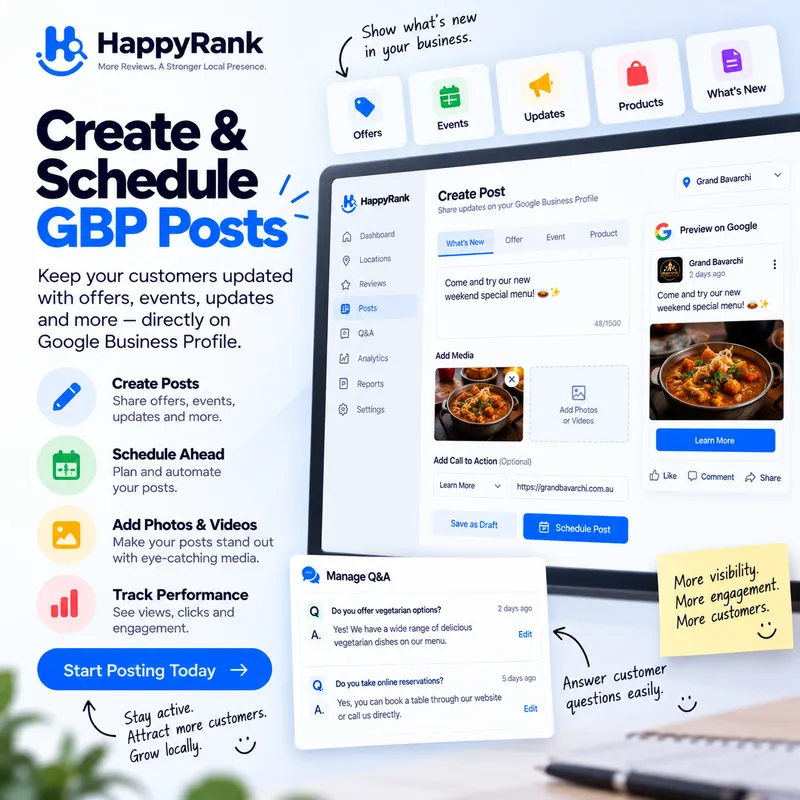
Publish offers and updates directly to your Google Business Profile and manage customer questions with drafted answers — all from one dashboard.
Why Teams Choose Happy Rank Local Posts & Q&A Manager
Draft-First Publishing
Create high-converting Google updates with CTA buttons and photos, then post directly to your listing.
Customer Q&A Management
Monitor questions asked on your profile and publish verified answers before competitors can confuse shoppers.
Keep Listings Active
Consistent posts and answered questions show Google your business is active and open for customers.
Google Business Profile posts are short, punchy updates that appear directly on your listing in Search and Maps — offers, announcements, seasonal tips, and trust signals shown to shoppers at the exact moment they compare options. Profiles that publish consistently look alive, active, and open for business; profiles with a stale, empty updates tab quietly suggest the opposite. The gap between knowing that and publishing every week is the familiar one: writing, formatting, remembering, repeating.
Happy Rank closes the gap two ways. The AI post generator drafts high-converting local posts — catchy opener, two to three sentences of genuine value, and a call to action with the right button — which you review and publish to Google in one click. Weekly auto-post rules go further, generating and either drafting or publishing a fresh post per location on schedule through an automated cron pipeline, with template fallbacks if AI is ever busy. This guide covers the draft-first workflow, bulk generation, scheduling, and honest notes on where Google's Q&A stands today.
What Google Business posts actually do for a listing
A post is a direct channel to shoppers comparing options on Search and Maps. Unlike reviews, which you receive, or photos, which merely show, a post lets you speak: announce the seasonal special, explain the service customers misunderstand, share the quick tip that proves expertise. Each post carries a call-to-action button — call, book, order, learn more — turning attention into the phone calls and visits that local businesses live on.
Google has never confirmed posts as a direct ranking factor, and honest vendors say so plainly. The effect is indirect but well-documented: posts that earn clicks, calls, and direction requests lift the engagement metrics Google's local algorithm does read. Better posts drive more engagement, and stronger engagement signals a relevant, active business. The relationship compounds over quarters for profiles that publish steadily and disappears for profiles that post twice and quit.
The anatomy of a high-converting local post
Winning posts follow a repeatable shape: a catchy opening sentence with a local hook, two to three sentences delivering a tip, solution, or offer with the exact business name used naturally, and a closing call to action inviting the call or visit. Length lands at one hundred to two hundred words across two or three short paragraphs — substantial enough to persuade, short enough to survive a phone screen. No hashtag stuffing, no markdown headings, no blog-article sprawl.
Imagery matters as much as words. Posts accept a featured photo via image URL, and listings with real, recent photos of work, staff, and premises consistently outperform stock-feeling graphics. The dashboard's draft-first workflow keeps the photo step visible rather than optional, because a post without an image surrenders half its stopping power in the feed.
The draft-first publishing workflow
Every post begins as a draft you control. Describe the topic — a service, an offer, a seasonal angle — optionally set the tone, and the generator returns complete post text with a suggested call-to-action button. Single generation is instant and conversational: type the idea, get the copy, adjust anything, publish to Google with one click. If the AI service is ever busy or initializing, a high-quality local template engine fills in immediately so your workflow never stalls on someone else's outage.
Bulk generation scales the same idea to content planning. Request up to ten posts at once and receive distinct angles — the educational local tip, the common problem and solution, seasonal maintenance advice, quality and trust spotlights, the why-choose-local offer — each created directly as a draft in your workspace. One sitting produces a month of varied, non-repetitive content instead of four Thursdays of panic-writing.
From draft to published: statuses you can trust
Posts move through a visible lifecycle — draft, scheduled, published, failed — tracked per location in the dashboard. The transparency matters operationally: a glance shows what is queued, what went live, and what needs attention, rather than a mystery feed you hope is working. Failed publishes surface with their errors instead of vanishing, so nothing important is ever assumed live when it is not.
For teams and agencies, drafts double as an approval layer. Junior staff or AI can fill the drafts tab; a manager reviews, edits, and publishes. The client sees consistent weekly output; the business never risks an unreviewed public message. Process beats heroics, and the status pipeline is the process.
Weekly auto-post rules and scheduling
Manual publishing wins weeks; scheduling wins quarters. Auto-post rules generate a fresh, localized post per location on a weekly rhythm: the scheduler computes the next run, the cron pipeline wakes up, generates text through the same AI path with template fallback, and — depending on your setting — either saves a draft for review or publishes directly to Google. Per-location toggles mean the flagship store can auto-publish while a sensitive client stays draft-for-review.
Scheduling respects the same guardrails as everything else. Monthly post quotas follow your plan and are enforced before generation runs, with skipped runs logged plainly when paywalls would be exceeded. Publish failures degrade gracefully to drafts rather than erroring into the void. And because the pipeline shares the single generation helper with manual actions, scheduled posts and hand-made posts read as one consistent voice, not two systems fighting.
Designing a schedule that compounds
The highest-return cadence for most locations is one genuine post per week rotating through the proven angles: tip, problem-solver, seasonal advice, trust proof, offer. That rhythm keeps the updates tab permanently fresh — Google shows recency — without demanding daily creativity. Bulk-generate the month's drafts in one sitting, let the weekly rule handle cadence, and spend the saved hours answering reviews instead.
Review performance quarterly by asking which topics drove calls and direction requests in your analytics snapshots, then weight the next quarter toward winners. Over two or three cycles the account develops a house style and a proven topic list, and content planning shrinks from a chore to a checklist.
A straight answer on Google Q&A
Google retired the public questions-and-answers section on Business Profiles at the end of 2025 and is moving toward AI-generated answers assembled from your profile, reviews, and website. That industry shift is exactly why the answers you used to post in Q&A now belong in durable places you control: your services list, your business description, and a real FAQ page on your website. Happy Rank's direction follows the same logic — invest in posts and profile completeness, which Google surfaces everywhere, rather than in a deprecated surface.
Where Google still surfaces customer questions on a listing, monitoring them remains worthwhile, and historical Q&A content in your workspace stays searchable for reuse as website FAQ material. The practical migration is simple: audit any old Q&A answers worth keeping, fold the best ones into posts and your site FAQ with proper schema, and let the weekly post rhythm carry the freshness signal Q&A once provided.
Turning old answers into durable content
Each rescued answer becomes three assets: a Google post announcing the point, a website FAQ entry marked up with FAQ schema for rich results, and a line in staff talking points so phone answers stay consistent. Content that lived in one fragile Google widget becomes owned media working in three places.
Going forward, treat recurring customer questions as a content calendar. Every question asked twice earns a post; every question asked five times earns a permanent FAQ entry and possibly a service description update. The questions were always market research — now they are processed like it.
Keeping listings active without burning out
Consistency beats intensity in local content. A profile with fifty-two genuine weekly posts dramatically outperforms one with a heroic January burst and eleven silent months — both in customer perception and in the engagement trail Google observes. The entire Happy Rank posts system is engineered around that truth: bulk drafts remove the blank-page tax, scheduling removes the remembering tax, and status tracking removes the wondering tax.
Start this week with a concrete minimum: generate five bulk drafts, publish the best one today, enable the weekly rule in draft mode, and review the drafts tab every Monday with coffee. Within a month the updates tab reads as an alive business; within a quarter the analytics snapshots show whether the compounding has begun. Small, scheduled, sustained — that is the whole secret, and the tooling exists precisely to make it effortless.
Measuring whether posts are working
Judge posts by post-attributable behavior over months, not by vanity counts after days: profile actions trending up in snapshots, calls and direction requests holding steady through off-seasons, and the updates tab never going stale. Compare quarters with similar seasonality before declaring victory or defeat — local demand breathes with weather and holidays.
When numbers plateau, change one variable at a time: stronger local hooks in openers, more specific offers, better photos, or a different CTA button. The draft workflow makes experimentation nearly free, and the status history records what you tried. Local content is a laboratory that happens to also be a storefront.
Bulk planning: a month of posts in one sitting
The blank page is the enemy of consistency, and bulk generation defeats it by producing up to ten distinct posts in a single request — each created directly as a draft in your workspace. The angles rotate through the proven set automatically: the educational local tip, the common problem and its solution, seasonal maintenance advice, quality and trust spotlights, and the why-choose-local offer. One focused sitting yields a month of varied content instead of four Thursdays of panic.
Variety is not decorative; it is diagnostic. Distinct angles reveal which messages move each audience — tips that earn calls from researchers, offers that convert the price-aware, trust stories that reassure the cautious. A month of sameness teaches nothing; a month of deliberate variety teaches the content strategy for the quarter. Bulk drafts are thus research instruments wearing a productivity disguise.
If the AI service is ever busy, the template engine fills in with high-quality local fallbacks rather than erroring, so planning sessions never stall on someone else's outage. Drafts queue patiently in the status pipeline until review day, and nothing expires or degrades while waiting. The system treats your planning time as sacred and never wastes it.
Pair bulk planning with the weekly auto-post rule for the complete machine: monthly human judgment on angles and quality, weekly automated cadence on timing, draft-mode review as the standing quality gate. The owner spends one hour a month on content and the profile reads as alive every single week — leverage no manual routine can match.
Keeping a topic bank
Maintain a running list of post-worthy material per location: seasonal jobs and their timing, frequently asked questions from the counter, behind-the-scenes moments worth photographing, supplier or community stories, and every offer with its dates. Feed the bank continuously — a phone note after each interesting customer interaction — and bulk sessions start from abundance instead of emptiness.
Retire topics that underperform twice and double down on winners with sequels: the drain-care tip that drove calls earns a winter-pipe follow-up; the team Spotlight that converted earns a series. The bank evolves from a list into an editorial memory, and after a year it contains the location's proven canon — the twenty topics that demonstrably work, ready to refresh and rerun forever.
Everything You Need to Know
Everything you need to know about Local Posts & Q&A Manager and how it works.
Where do published posts appear?
Posts appear directly on your Google Business Profile — visible on Search and Maps when customers view or expand your listing. They're a direct channel to shoppers comparing options.
Can I schedule posts in advance?
Not yet — you can publish posts instantly with one click. Automated scheduling is coming soon.
What can I include in a post?
A message (updates, offers, announcements), a call-to-action button with destination link — like Book, Order or Learn more — and an image URL for the featured photo.
How does Q&A management work?
Questions customers ask on your profile appear in your dashboard. Answer them publicly from Happy Rank, and seed your own frequently-asked questions so shoppers see accurate answers first.
Start Ranking in Your Local Map Pack Today
Join thousands of local business owners and SEO agencies growing inbound calls with Happy Rank.