Google Business Profile Sync
Connect your Google Business Profile via official Google integration. Sync locations, hours and categories.
Why Teams Choose Happy Rank Google Business Profile Sync
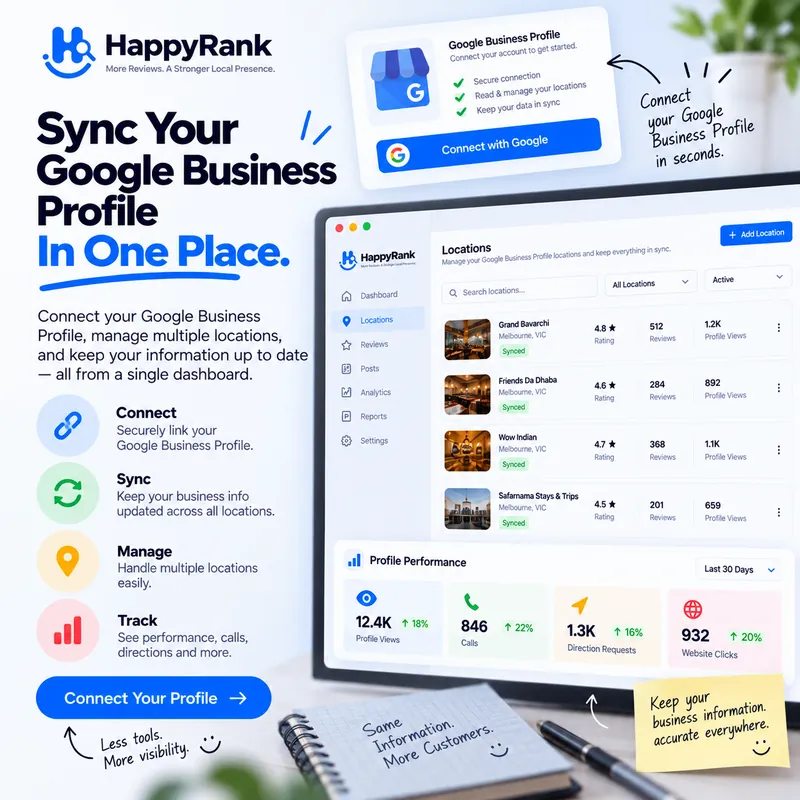
Official Google Integration
Direct, secure OAuth integration with Google Business Profile. Never share passwords or risk listing bans.
Instant Two-Way Sync
Update hours, photos, address attributes, and service categories across all your listings in seconds.
Manage All Your Locations
Connect multiple Google accounts and manage dozens of client locations from one unified dashboard.
Your Google Business Profile is the storefront most customers see first — the hours, photos, address, categories, and reviews that decide whether they call you or the business next door. Managing it by hand across one listing is tedious; across five locations or fifty client accounts it becomes a full-time job of copy-pasting and hoping nothing drifted. Happy Rank replaces that grind with an official, secure OAuth integration to the Google Business Profile API: connect once, and your locations, details, and performance flow into one workspace that stays in sync.
Everything on this page describes real behavior, not aspirations. What syncs, how multi-account management works, how tokens stay fresh, and how you disconnect — all of it maps to controls you will find in the dashboard. If you manage locations for clients, pay special attention to the multi-account and workspace sections: they are the difference between juggling logins and running an operation.
Readers connecting their first location should follow the page in order — security model, synced fields, then the setup sequence that turns connection into baselines. Agencies evaluating the platform for client work will find the multi-account architecture and the onboarding checklist most relevant, since those determine whether the tool reduces operational overhead or merely relocates it. Either way, the disconnect and data-control section at the end documents the exit before you ever need it.
Official Google integration means no passwords, no scraping, no risk
Happy Rank connects exclusively through Google's official OAuth flow and the Google Business Profile API. You sign in with Google, grant the business-management scopes, and we store encrypted tokens — your Google password is never typed into our systems, never stored, and never needed again. There is no screen-scraping, no unofficial automation touching your listings, and nothing that puts your profiles at risk of flags or bans.
That distinction matters more than it sounds. Tools that scrape Google or ask for your password operate outside Google's terms, and the business pays the price when something breaks: lost access, corrupted hours, or a suspended listing at the worst possible moment. An API integration behaves like a well-mannered guest — it reads and writes through the same doors Google built for the purpose, with permissions you granted and can revoke at any time.
How the connection stays alive
Google access tokens expire quickly by design, so Happy Rank refreshes them automatically behind the scenes and persists the renewed tokens back to your account record. You never re-authenticate for routine work; the dashboard simply keeps working. If a refresh ever fails — a revoked grant, a changed password, an undecryptable token — the account is cleanly marked disconnected and the interface tells you exactly which Google account to reconnect on the Profiles page.
Every token is encrypted at rest and decrypted only at the moment of an API call. Token lookups are always scoped to your own workspace, so one user can never read or act on another user's Google connection. Security here is not a badge on a marketing page; it is the shape of the data model.
What actually syncs into your workspace
Connecting an account pulls your locations into Happy Rank with the fields that drive local visibility: location names, street addresses, phone numbers, websites, primary categories, map coordinates, business descriptions, opening hours, special hours, and service areas. These land in your workspace as structured location records that every other feature — heatmaps, reviews, posts, reports — builds on. Fix a phone number once and the whole platform agrees about it.
Sync is refresh-driven rather than magical. When details change on Google's side, refreshing the connection brings the workspace up to date; when you manage profile content through Happy Rank, changes push out through the same official channels. The practical result is a single source of truth: no more wondering whether the hours on Maps match the hours on the website, because both flow from the same synced record.
Hours, categories, and attributes deserve special attention
Opening hours and special hours are the most common source of customer anger in local search — nothing burns trust like driving to a closed store Google said was open. Categories are the quietest ranking lever: the primary category tells Google what you fundamentally are, and getting it wrong suppresses you for your best keywords. Sync keeps both visible and editable in one place instead of buried three clicks deep in Google's interface.
Service areas deserve the same discipline for businesses that travel to customers. Kept current and consistent with the territory you actually serve, they reinforce the relevance signals that geo-grid scans then verify street by street. Sync first, scan second, and the two features corroborate each other.
Multiple Google accounts, one workspace
Real businesses rarely live in a single Google account. A previous owner holds one login, the marketing agency holds another, and the new locations were claimed under a third. Happy Rank lets you connect several Google accounts and switch between them, with locations from every connected account managed inside one workspace. The mess of shared passwords and forwarded verification emails collapses into a clean list.
For agencies this is the entire workflow. Each client's locations arrive through their own Google account connection, but your team works in a single dashboard with role-based access. Onboarding a new client means connecting their account and watching their locations appear — no credential handoffs, no logging in as the client, no Friday-afternoon password archaeology.
Switching accounts without losing context
Because every location record remembers which Google account it came from, switching accounts never strands your data. Reviews, posts, rankings, and reports stay attached to the location while the token layer handles which credential talks to Google. Staff can move between clients without ever touching a password field.
When a client relationship ends, disconnecting their Google account removes the token link and stops all syncing immediately, while your workspace history remains intact for final reporting. Clean exits are a feature agencies undervalue until the first messy one.
From sync to everything else
Sync is the foundation the rest of the platform stands on. Heatmaps need accurate coordinates and categories to scan the right battles. Review management needs the location linked to its Google identity before replies can publish. Posts need the listing connection before they can go live on Search and Maps. Performance snapshots need the profile relationship before Google shares impression and action data. Each feature assumes sync did its job, which is why connecting properly on day one pays dividends everywhere else.
The recommended first-week sequence is simple: connect every Google account, verify that every real location appears exactly once, correct names, categories, hours, and service areas, then let the first round of scans and snapshots accumulate. By week two you have truthful baselines — a synced profile, a first heatmap, initial performance data — and every subsequent improvement is measurable against them.
Keeping the sync healthy over time
Businesses change: holiday hours, new phone systems, added services, moved premises. Treat the workspace as the system of record and refresh connections after any real-world change. The Profiles page shows connection health at a glance, and any account that needs re-authentication says so plainly instead of failing silently.
Pair sync hygiene with a monthly audit habit: one pass over hours and categories per location, one glance at disconnected-account warnings, one confirmation that new locations got claimed into the right account. Ten minutes a month prevents the slow drift that quietly costs calls.
Disconnecting and data control
You can disconnect any Google account with one click, whenever you want, for any reason. Disconnecting removes the token link for that account and stops all syncing immediately — no retention of access, no background calls, no dark patterns requiring a support ticket. Reconnecting later is the same OAuth flow as the first time and takes under two minutes.
Your workspace data — locations, reviews history, scans, posts, reports — remains yours throughout. The connection is a pipe, not a cage: it exists to move data with your permission and stops the moment permission is withdrawn. That is how an official integration should behave, and it is how this one does.
What to check before you disconnect
Scheduled automations that publish posts or replies depend on a live connection, so review active auto-post rules and auto-publish settings first — they will safely skip while disconnected rather than fail loudly, but paused growth deserves a conscious decision. Export or generate any pending client reports beforehand so the final numbers are captured.
For agencies handing an account back to a client, generate the closing performance report first, then disconnect. The client keeps their Google assets untouched; you keep a clean paper trail. Everyone parts as friends.
Agencies: running client sync as a service
Client onboarding is where agencies win or bleed time, and connection quality decides which. The standardized flow takes under fifteen minutes per client: invite them to complete the Google OAuth grant themselves (never handle their password), verify every real location appears exactly once in the workspace, correct names and primary categories on the spot, and confirm hours and service areas against reality. Each step prevents a category of downstream failure — duplicates, miscategorization, stale hours — that otherwise surfaces months later as a ranking mystery.
Permission hygiene separates professionals from improvisers. Team members get workspace roles matching their responsibilities, clients get visibility appropriate to the engagement, and nobody outside the engagement ever sees the account. Because tokens are encrypted and scoped per workspace, adding a junior staffer to one client's locations never exposes another client's connection — the data model enforces what policies merely promise.
Package sync as a line item, not a freebie. An initial profile audit and cleanup — categories corrected, hours verified, service areas aligned, duplicates flagged — is tangible, valuable work clients understand immediately. Recurring sync health checks fold into the monthly retainer beside scans and reviews, turning invisible maintenance into itemized care the client sees on every invoice.
Offboarding deserves the same choreography as onboarding. Generate the closing performance report while the connection still lives, export any client-owned summaries they are owed, revoke team access, then disconnect the Google account with one click. The client retains untouched Google assets plus a final record of what the engagement achieved; the agency retains a clean workspace and a reputation for tidy exits that referees future business.
A client onboarding checklist
One, OAuth grant completed by the client themselves with business-management scopes. Two, location inventory reconciled — every real storefront present once, closed or duplicate listings flagged for Google-side cleanup. Three, categories, hours, phone, website, and service areas corrected and refreshed. Four, first heatmap and performance baselines scheduled so improvement becomes measurable from day one rather than debatable forever.
Five, roles assigned and the client shown their view: where reports arrive, how to reach the team, what happens each month. Onboardings that end with the client understanding the rhythm retain; onboardings that end with a login email churn. The checklist takes minutes and pays for quarters.
Everything You Need to Know
Everything you need to know about Google Business Profile Sync and how it works.
Is this an official Google integration?
Yes. Happy Rank connects exclusively through Google's official integration and the Google Business Profile API. We never scrape Google or ask for your Google password.
Which profile details get synced?
Location names, addresses, phone numbers, websites, primary categories, coordinates, business descriptions, opening hours, special hours and service areas are synced into your workspace and kept up to date whenever you refresh.
I have multiple Google accounts. Can I connect them all?
Yes — you can connect several Google accounts and switch between them. Locations from every connected account are managed inside one workspace.
Can I disconnect later?
Anytime, with one click. Disconnecting removes the token link for that Google account and stops all syncing. You can reconnect whenever you want.
Start Ranking in Your Local Map Pack Today
Join thousands of local business owners and SEO agencies growing inbound calls with Happy Rank.