
AI Review Reply Automation: How to Automatically Respond to Google Reviews Without Losing Trust
AI review reply automation uses AI to draft context-aware replies to Google reviews and rules to decide how each review should be handled — including which reply to use, when to require human review, and how to track replies across locations and clients.
Replying to every Google review is one of the clearest signals a well-run local business can send. It shows customers you are listening, it builds trust before the next person decides to call, and it keeps your reputation current — not months out of date. The challenge is that doing this manually, inbox by inbox and location by location, rarely scales.
This guide explains how AI review reply automation actually works, how rule-based automation adds control, and how businesses and SEO agencies can use both together without sounding robotic. You will also see how HappyRank Reply Automation fits into that workflow — introduced naturally after the educational foundation.
Why Businesses Need to Reply to Google Reviews
A review is a conversation starter. How you respond — or whether you respond at all — shapes what the next customer expects from you:
- Customer communication. A timely, specific reply tells the reviewer their feedback was heard. Google's own guidance on reading and replying to reviews recommends responding to reviews as part of managing customer communication. A short thank-you for a positive review matters; a calm, professional reply to a critical one matters even more.
- Reputation management. Your replies are public. Future customers read them to understand how you treat people, not just how you handled one case. Consistent responses reduce perceived risk before someone books.
- Showing responsiveness. A live reply history — across weeks and months — reads as an active, managed business. A profile with years of unanswered reviews reads the opposite.
- Building trust. Specific language builds trust: the dish that was enjoyed, the technician who helped, the condition that was explained. Generic copy does not.
- Handling both kinds of feedback. Positive reviews deserve recognition that reinforces what went well. Negative reviews deserve acknowledgment and a path to resolve the issue offline without arguing publicly.
When nobody owns the workflow, unanswered reviews pile up. Customers stop leaving new ones, staff lose track of what has been handled, and the profile quietly looks neglected — even when the underlying service is good. For context on how positive and critical reviews shape decisions differently, see our deep dive on handling negative Google reviews.
Why Manually Replying to Every Review Doesn't Scale
For a single location with a handful of reviews a month, manual replies are manageable. Once volume, locations, or clients increase, the same approach breaks in predictable ways:
- High review volume. A restaurant or clinic collecting dozens of reviews per month needs someone to read, write, and publish every few days — not in a quarterly burst.
- Multiple locations. One central inbox hiding five location inboxes creates blind spots. A delayed reply at one location becomes invisible to the owner at another.
- Multiple clients for agencies. An agency managing ten local businesses is really managing ten different voices, ten escalation paths, and ten reporting expectations.
- Repetitive writing. Writing thank you for your kind words for the thirtieth time is where quality drops — even with good intentions.
- Delays. Without a schedule, replies lag from days to weeks. Customers notice, and prospects interpret silence as indifference.
- Inconsistent tone. Different staff members improvise different voices. The result reads as fragmented rather than consistent.
- Difficult tracking. Spreadsheets tracking replied vs pending reviews quickly drift from reality when new reviews arrive daily.
These are workflow problems — not writing problems. They are what make automation worth understanding, especially if you are responsible for more than one listing.
What Is AI Review Reply Automation?
AI review reply automation combines two ideas that solve different parts of the problem:
- AI-generated replies. AI reads the review's rating and text and drafts a context-aware reply — matching sentiment, referencing specifics where possible, and staying within a brand-safe tone. The draft is a starting point, not a final publication.
- Automation and rules. Rules determine when and how a reply is handled: which draft style to use, whether the reply should be reviewed before publishing, and how to treat different review situations differently.
- Reporting and visibility. A shared view of what was replied, what is pending, and what each rule produced — so teams can stay on top of the inbox without hunting across profiles.
Used alone, AI improves writing speed but does not solve workflow control. Used alone, rules improve routing but do not solve the blank-page problem. Together, they handle both: the writing and the decision-making.
How Rule-Based Review Reply Automation Works
Rules are simple if/then statements applied to incoming reviews. When a new review arrives, the system evaluates conditions — such as rating, content, or location — and selects the handling that matches. A useful mental model:
New Review → Check Rule → Generate Appropriate Reply → Review / Publish According to Workflow → Track in ReportsExample 1 — Five-star reviews. When a review arrives with a five-star rating, the business can route it to a thank-you style reply. The draft should reference something specific from the review — a service, a dish, a staff member — rather than repeating the same generic sentence every time. These are the safest candidates for faster handling because the context is positive and the response is low-risk.
Example 2 — One- to two-star reviews. Lower-rated reviews often require a more careful response and human follow-up rather than publishing a generic reply immediately. A rule can tag these for manual review, drafting a calm acknowledgment that thanks the reviewer, apologizes without admitting legal fault, and invites an offline conversation. The team member then edits and publishes when ready. Google's policy on prohibited and restricted content and its guidance on review replies are the correct references for what belongs in a public reply.
Example 3 — Keyword-based reviews. Some businesses benefit from rules that trigger on words or topics in the review text, where supported. For example, a review mentioning delivery or wait time could receive a reply that specifically acknowledges that topic and explains next steps. Keyword rules make responses feel specific rather than canned.
Example 4 — Different rules for different locations. A multi-location business or agency may want location-specific behavior — for instance, routing one city's reviews to a local manager while applying a shared style for the rest of the brand. Location-aware rules keep a standard approach where it helps and local ownership where it matters.
AI Replies vs Rule-Based Automation: What's the Difference?
AI generation and rule-based automation address different questions. Most teams need both:
| Capability | AI Reply Generation | Rule-Based Automation | Combined Approach |
|---|---|---|---|
| Primary job | Writes a context-aware draft | Decides how each review is handled | Writes the right draft and routes it correctly |
| Handles different review types | Same generation style without routing | Different handling per rating/keyword/location | Different reply style per situation, drafted by AI |
| Speed | Fast drafting | Fast routing | Fast drafting and fast routing |
| Control | Limited workflow control | Strong workflow control | Controlled workflow with tailored replies |
| Risk of robotic replies | Medium if one prompt is reused | Medium if every review hits one rule | Lower — variety is built into the rule set |
| Reporting | No visibility beyond drafts | Visibility into rule outcomes | Full visibility into what was handled and how |
| Best for | Solo owner with light volume | Teams needing triage and routing | Businesses and agencies that need both quality and scale |
Combining AI with rules produces a system where each review gets an appropriate reply style rather than a single template applied everywhere — and where the team can see what the system did.
Introducing HappyRank AI Review Reply Automation
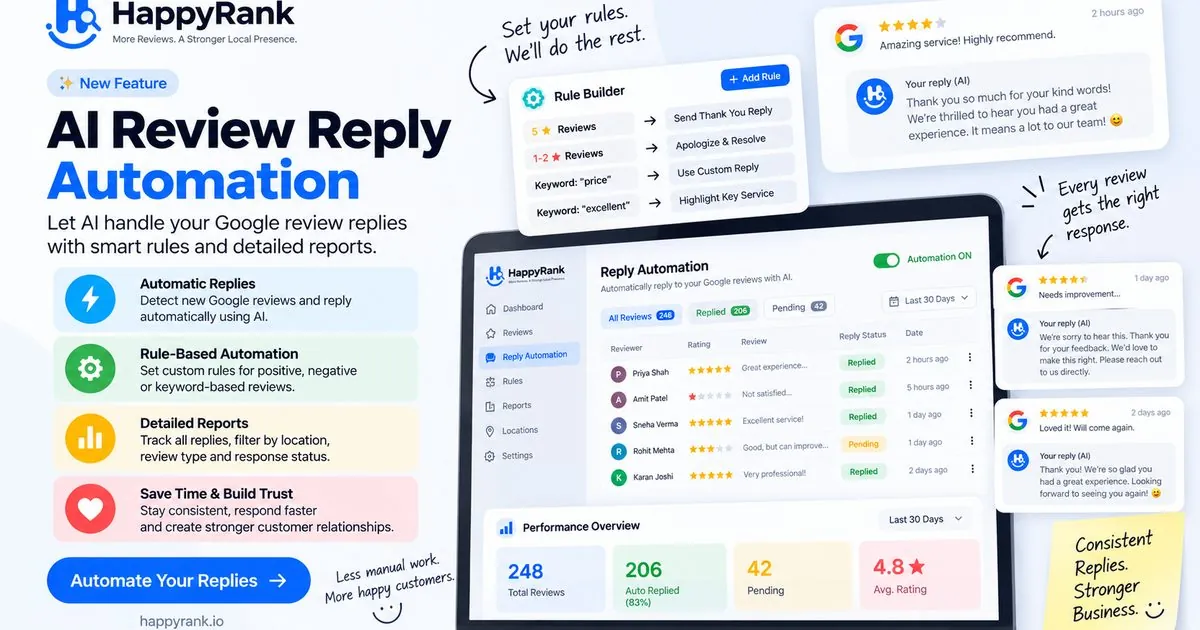
HappyRank approaches review replies with the workflow shown in its product image: Immediate AI reply automation that detects new Google reviews and replies automatically using AI — with the ability to keep automation on or off — plus the controls teams need to handle different review situations well. The AI Review Replies feature is the home for this capability on the Happyrank site.
- Automated review handling. Automation can be enabled to detect new Google reviews and generate replies without requiring someone to remember to check the inbox. It stays in sync with what is happening on your profiles.
- AI-generated responses. Replies are drafted in a context-aware way — reflecting rating and content where available — so responses feel specific rather than copied.
- Custom rules via the Rule Builder. Businesses and agencies can set custom rules for different review situations — such as positive, negative, or keyword-based reviews — so each type of review receives an appropriate response rather than the same reply everywhere.
- Response status you can see. The dashboard surfaces Replied vs Pending reviews, with activity visible over a selectable period such as Last 30 Days — so nothing quietly slips through the cracks.
- Reporting for oversight. A Performance Overview summarizes total reviews, auto-replied counts and pending items, and average rating — giving owners and account managers a single place to monitor the workflow.
- More efficient multi-location and multi-client management. Filtered views by location, review type, and response status reduce the need to check each listing separately — especially useful when several profiles are under one team.
In short: automation handles detection, AI handles drafting, rules handle judgment, and reports handle visibility — each visible in the same place so the team knows what has happened and what still needs attention.
How HappyRank Reply Automation Works
1. A New Review Comes In
Every workflow starts with a new review appearing on your connected Google Business Profile. Whether it is a one-line five-star rating or a detailed complaint, it is captured in the same inbox rather than scattered across individual profile logins.
2. HappyRank Evaluates the Review
The system evaluates the review against your rules — typically considering the star rating, the review content, and where relevant the location or keywords. This is where different reviews take different paths rather than all following the same treatment. Only the evaluation logic itself is described here; the underlying implementation is product-internal and not material to the outcome for the team using it.
3. The Appropriate Reply Is Generated
An AI-generated reply is produced that matches the review's sentiment and context. Positive reviews receive a thank-you tone that can reference what went well; critical reviews receive a calm acknowledgment that thanks the reviewer, apologizes without arguing, and offers to continue the conversation offline. As described on the AI Review Replies page, you stay responsible for your public voice — drafts should be reviewed before they are published where the situation is sensitive.
4. Your Rules Control the Workflow
Your rules determine how each situation is treated. Practical examples:
- Positive reviews (five stars). Route to a thank-you style reply referencing something specific in the review.
- Negative reviews (one to two stars). Route to a more careful apologize-and-resolve style reply and hold for human review before publishing, so someone can adjust the tone or escalate internally.
- Keyword-specific reviews. Where supported, route reviews containing words like price or excellent to a reply style tailored to that topic — for example acknowledging the concern or highlighting the service mentioned.
- Custom business situations. Define your own handling for topics that matter in your market — such as mentions of a specific service, a recurring question, or a branch-specific procedure.
5. Track Everything with Reports
The Reports view and Performance Overview panel show what has been replied, what remains pending, and how average rating and activity are trending over the selected period. Filter by location, review type, or response status to spot bottlenecks — for example, whether one location has a growing pending queue while others stay clear. Reporting closes the loop between automation and management: it turns replies into a visible, reviewable workflow.
Use Cases for AI Review Reply Automation
Restaurants. The problem is speed: lunch and dinner rushes generate clusters of reviews that need replies within days, not weeks. Automation drafts warm, specific thank-you replies for the bulk of positive reviews; rules hold lower-rated reviews so a manager can reply personally and investigate the visit before publishing. Keyword rules help when reviews mention dishes, delivery, or wait time.
Salons and beauty businesses. Reviews are often specific — stylist names, treatments, results. The writing quality of replies affects how prospects perceive the experience. Automation drafts replies that reference the service mentioned; human oversight remains important when a review is emotional or involves a stylist by name, so the response feels personal rather than procedural.
Home service businesses (plumbers, electricians, cleaners). Field teams are not at desks to monitor inboxes. Automation handles the common case — a quick, thoughtful thank-you to satisfied customers — while rules escalate complaints and keyword mentions (such as pricing or punctuality) to an owner or office manager who can actually investigate before replying.
Clinics and professional local businesses. Reputation is sensitive. Automation helps with timely replies for positive reviews and generic acknowledgment drafts for critical ones, but human review is essential before any public statement — avoid sharing or repeating personal details, and redirect clinical concerns to a private channel.
Retail stores. Higher foot traffic produces higher review volume and more rating-only reviews that still deserve a reply. Automation drafts brief, varied thank-you notes at scale, while reports reveal whether any location's replies have fallen behind the others.
Multi-location businesses. The challenge is consistency across locations with local accountability. Location-aware rules keep a shared brand voice while allowing each location's manager to handle the sensitive cases for their site. A single dashboard showing replied vs pending across all locations makes the actual coverage visible — which is where operational trust comes from.
SEO agencies managing multiple clients. Agencies turn reputation work from repetitive drafting into controlled operations: client-specific rules, location filters, response-status monitoring, and reporting for client check-ins. The critical principle remains the same: automate the routine, keep human oversight for the sensitive. For a pattern agencies already know, see how teams standardize visibility work with geo-grid heatmaps and GBP sync — review automation follows the same logic: measure, handle systematically, and report clearly.
AI Review Replies Should Not Mean "Set It and Forget It"
Automation is most useful when it reduces repetitive work — not judgment. Treat it as an assistant that handles the first draft and the routing, while the people responsible for reputation make the final decisions where risk is higher.
- AI should assist, not replace judgment. Negative reviews, emotional language, and accusations require human context that no model can supply from the review text alone.
- Escalate sensitive cases. Serious complaints, legal or safety concerns, and private customer information should go to a human — preferably someone who can act on the underlying issue, not just write about it.
- Reflect the actual experience. If the review mentions a specific visit, service, or event, the reply should reflect it. If the content is vague, keep the reply shorter rather than inventing details.
- Avoid robotic repetition. When every reply sounds the same, readers infer automation — even when not told so. Vary phrasing, keep replies specific, and tune rules that are over-firing.
- Review your rules regularly. Rules encode assumptions about your business. As services, pricing, or teams change, revisit the rule set and the reply styles it triggers.
The strongest workflow is predictable day-to-day and visibly human when it counts. Automation handles the predictable part so people have capacity for the human part.
AI Review Reply Automation vs Manual Review Management
| Factor | Manual Process | AI-Assisted | Rule-Based Automation | AI + Rules |
|---|---|---|---|---|
| Speed | Slow — drafting one by one | Faster — drafts generated | Faster — routing is defined | Fastest — drafted and routed together |
| Consistency | Varies by who is writing | More consistent drafts | Consistent handling per rule | Consistent drafts applied consistently |
| Scalability | Poor — load grows linearly | Better — less writing time | Better — less triage time | Best — both writing and triage are systematized |
| Personalization | High when time permits | High — draft reflects review content | High — reply style matches review type | Highest — reply matches both content and situation |
| Workflow control | Manual and fragmented | Limited without rules | Strong — different paths per situation | Strongest — drafted replies follow controlled paths |
| Reporting | Spreadsheet-dependent | Minimal beyond drafts | Visible rule outcomes | Full visibility into replied vs pending and performance |
| Best use case | Single listing, light volume | Solo owner wanting faster writing | Teams needing triage and routing | Businesses and agencies handling multiple listings |
The right column is not always the right answer for every review. Use it as the default system and carve out explicit exceptions for the reviews where human review comes first — serious complaints being the clearest example.
How SEO Agencies Can Use Review Reply Automation
Agencies live with the hardest version of this workflow: many clients, many listings, many voices, and one reputation standard that must hold across all of them. A rule-based, reported system turns that into a deliverable — not a backlog.
- Managing multiple clients. Keep each client's voice and escalation path separate. What is appropriate for a restaurant is not what is appropriate for a clinic, even when the underlying rules look similar.
- Handling multiple locations. Use location-aware handling so each site's reviews are visible and actionable in one place — then assign ownership location by location.
- Creating client-specific rules. Build a small rule set per client (positive, negative, keyword) rather than one giant shared rule set. Smaller rule sets are easier to explain and easier to tune.
- Standardizing workflows. Define the default path (drafting and routing) and the exception path (escalation for sensitive reviews). Document both for each client so staff coverage does not depend on one person remembering.
- Monitoring pending reviews. Use the replied vs pending view over a rolling period, such as Last 30 Days, to catch coverage gaps before the client does.
- Reporting to clients. Share performance overviews showing total reviews, replied vs pending, and average rating — plus a short note on which rules fired and what was escalated. Numbers together with decisions are more credible than numbers alone.
- Reducing repetitive work. Automate the routine thank-you replies so the team's time is spent on the reviews where judgment actually moves the relationship — the complaints and the complex cases.
- Keeping human oversight for sensitive reviews. Make escalation the visible, expected behavior for serious language — not an afterthought when a bad reply has already been published.
Do not promise agency-specific automation behavior that the product does not provide. Keep the pitch tied to what the feature actually shows: detection, drafting, rules, status, and reports — used together to make client work auditable.
Best Practices for Automated Google Review Replies
- Keep replies specific. Reference a detail from the review — a dish, a service, an outcome — rather than repeating the same sentence for everyone.
- Avoid generic copy-paste language. If a reply would make sense for any business, it probably says nothing about yours. Use rules to create variety, not just speed.
- Match the review sentiment. A thank-you reply should not sound like a complaint handler, and a critical review should not receive celebratory language.
- Mention relevant details from the review — carefully. Echo what the reviewer actually said. Do not add facts or anecdotes the review did not contain, and do not repeat sensitive personal information in a public reply.
- Keep negative-review responses professional. Thank the reviewer, acknowledge the concern without arguing, and invite offline follow-up. Handle the substance outside the public thread — consistent with Google's reply guidance.
- Create escalation rules. Define in advance which reviews require human review before publishing — especially lower-rated or keyword-flagged ones.
- Review automation rules periodically. Monthly, check which rules triggered, which drafts were edited, and whether any style needs rewording.
- Maintain a consistent brand voice. One written voice guide (length, greeting, sign-off, words to avoid) prevents drift across drafts and across staff members.
- Monitor reports. A quick daily or weekly check of replied vs pending and performance trends is the cheapest quality control available.
What NOT to Automate
Some replies should not publish without a human in front of them first — no matter how confident the draft sounds:
- Serious complaints about treatment, billing disputes, or ongoing service failures where the facts need checking before any public statement.
- Legal threats or language suggesting liability — never admit fault, promise compensation, or argue the facts in a public reply. Move the conversation to a private channel and seek appropriate advice.
- Safety concerns involving injury, mishandled work, or risk — acknowledge the report and escalate internally before publishing any reply.
- Highly sensitive customer situations such as health-related concerns, family emergencies, or emotionally charged experiences where tone risk is high.
- Reviews that may be fraudulent, disputed, or left on the wrong listing — verify the review's relevance before replying, and consider reporting the review through Google's flag inappropriate review flow where appropriate.
- Situations requiring investigation where the right reply depends on knowing what actually happened — which only a staff member who can check can provide.
For every item above, a safe interim reply pattern is: thank the reviewer, acknowledge the seriousness, invite direct contact, and hold the detailed substance offline. Use that pattern after human review — not as a blind automatic publication.
Common Mistakes When Automating Review Replies
- One response for every review. A single template makes distinct reviews sound identical — and readers infer that nothing was actually read. Use different reply styles for different ratings and topics.
- Overusing AI-generated language. Repetitive adjectives, forced enthusiasm, or identical sign-offs across dozens of replies read as templated. Vary vocabulary and keep replies grounded.
- Ignoring negative reviews — or mishandling them. Negative reviews feel uncomfortable, so they are the easiest to leave unanswered and the worst to leave unanswered. Have an explicit rule and owner for them.
- Creating overly aggressive rules. A rule that fires too broadly creates the very generic output it was meant to avoid. Prefer narrower, more specific conditions and review them after the first week.
- Never checking reports. Reports are where automation proves it is working — or where gaps become visible. Without that check, a misfiring rule can run quietly for weeks.
- Automating without a clear escalation process. Every rule set needs named exceptions: who reviews what, how quickly, and where the follow-up happens outside the public thread.
Frequently Asked Questions
Quick answers to the most common questions about AI-powered review automation — each grounded in the workflow described above.
Final Takeaway
AI can handle the repetitive work, rules provide control, and reporting provides visibility — but businesses still need human judgment for sensitive situations. That combination is where reply automation is actually trustworthy: predictable day-to-day, visibly human when it counts. Treat the Rule Builder as the control surface and the reports as the proof that the system is behaving the way you intended.
If you manage more than one listing — or manage listings on behalf of clients — put that logic into a small rule set, keep escalation explicit, and build your routine around the replied vs pending view. The result reads as a business that replies consistently and thinks before it publishes.
Want to set this up with the product shown in this guide? Explore HappyRank AI Review Replies to see Reply Automation, the Rule Builder, and the detailed reports — or start from the [HappyRank homepage](/) and see how it fits alongside Smart QR Reviews, Google Business Profile sync, and geo-grid heatmaps.
Frequently asked questions
What is AI review reply automation?
It is a system that detects new Google reviews, generates a context-aware reply with AI, and uses rules and reporting to decide how each review is handled, tracked, and published.
Can AI automatically reply to Google reviews?
AI can generate replies automatically, but businesses should decide per review type whether replies publish immediately or require human approval — especially for negative or sensitive reviews.
What is rule-based review automation?
Rule-based automation defines how different reviews are handled — for example, thanking five-star reviews, escalating one- to two-star reviews, or using keyword-based rules where supported.
How do AI and rules work together?
AI handles the writing. Rules handle the workflow. Together they create the right reply for each review situation rather than one generic response.
Should businesses automatically reply to negative reviews?
Use caution. Lower-rated or sensitive reviews usually need human oversight. A common pattern is to draft helpfully with AI but hold negative reviews for manual review before publishing.
Can agencies automate review replies for multiple clients?
Yes. Agencies can create client- or location-specific rules, monitor replied vs pending reviews, and standardize reporting — while keeping human review for sensitive cases.
How do I avoid robotic AI review replies?
Use specific replies that reflect the review, keep a brand voice guide, avoid one generic template, review your rules regularly, and monitor reports for repetitive language.
Why are reports important for review automation?
Reports show what was replied, what is pending, and which rules are firing — so you can catch delays, gaps, and rules that need adjustment.
Can I create different rules for different review types?
Yes. Rule-based automation is designed for that — rating-based, keyword-based, and location-specific rules so different review situations receive appropriate replies.
When should a human review an AI-generated response?
When reviews contain serious complaints, legal or safety concerns, sensitive customer situations, or claims that need investigation — and whenever publishing immediately could create risk.