
How to Get More Google Reviews from Customers (Without Chasing Them)
To get more Google reviews, ask happy customers right after a good experience, give them a one-scan path via QR code, help them know what to write, send one polite SMS or email follow-up, and respond to every review you receive.
Getting a steady flow of Google reviews is one of the highest-leverage things a local business can do — and one of the most frustrating. Almost every owner knows reviews matter. Very few have a reliable system for earning them.
The problem usually is not service quality. It is friction. The customer had a great visit, fully intended to leave a review, and then life happened. This guide is for local business owners and for SEO agencies managing review collection for clients. You will learn why customers do not review, which ethical strategies work, how to ask without sounding pushy, and how a guided flow like HappyRank Smart QR Reviews removes the hardest part: staring at a blank review box.
Why Google Reviews Matter for Local Businesses
Before fixing your review collection, it helps to be clear on what reviews actually do for you:
- Trust and credibility. Most customers read reviews before contacting a business they have never used. A profile with recent, detailed reviews reads as an operating business that takes customers seriously.
- Customer decision-making. Reviews answer the real questions: is this place consistent, how do they treat people when something goes wrong, what is the experience actually like? Specific reviews reduce perceived risk far better than marketing copy.
- Local search visibility. Google's own documentation describes reviews as content customers and Google alike use to evaluate businesses. A complete, actively managed profile with fresh reviews and owner responses gives customers more reasons to choose you. Avoid anyone who promises that a fixed number of reviews equals a fixed position — local visibility depends on many factors.
- Social proof at scale. Every detailed review is a small case study written in the customer's own words. Prospects believe other customers more than they believe you, which is exactly why review content converts.
- Conversion potential. Two businesses can sit side by side in the results while one gets the call. The difference is usually review quantity, recency, detail — and whether the owner visibly responds.
Pair collection with fast, thoughtful replies; see HappyRank's AI review replies and our guide to handling negative Google reviews.
Why Customers Don't Leave Reviews
Happy customers rarely refuse to leave a review. They just never get around to it. Five friction points explain nearly all of it:
- They forget. The intent is real at checkout and gone by dinner. Anything that delays the ask by days loses most of its power.
- They don't know what to write. A bare Great service, highly recommend feels inadequate, and writing something better feels like homework. Blank text boxes are intimidating.
- The process feels like work. Find the business on Google, tap through to reviews, sign in, write, post — every extra step loses people, especially on mobile.
- Businesses ask at the wrong time. Asking before the service is finished, during payment stress, or weeks later by surprise all perform poorly. The best moment is right after a positive outcome, while the experience is fresh.
- Customers don't know where to leave the review. Leave us a review online sends people to Yelp, Facebook, or a confused Google search. A direct path to your Google review form removes the guesswork — Google explains how to share a direct review link or QR code from your Business Profile.
The Best Ways to Get More Google Reviews
There is no single trick. Businesses that collect reviews consistently do several small things well:
- Ask at the right moment. Right after the meal, the haircut reveal, the completed repair, the successful appointment. Tie the ask to the smile, not to a calendar date.
- Make the process simple. One scan or tap should take the customer exactly where they need to be. Every instruction you have to explain costs you reviews.
- Use QR codes. A visible, well-placed code turns a verbal ask into a two-second action.
- Ask personally. A genuine request from the person who delivered the service outperforms any sign. It would mean a lot to me if you shared that on Google is personal and honest.
- Use SMS or email follow-ups where appropriate. One polite follow-up a day or two later catches customers who meant to review but forgot. Keep it to one message, and only message customers who agreed to hear from you.
- Train staff to ask naturally. Give your team exact wording, tell them which moment to choose, and make asking part of the job — not an awkward extra.
- Add review requests to customer touchpoints. Receipts, thank-you cards, appointment confirmations, invoices, packaging. Customers should encounter one easy path, not five confusing ones.
- Respond to existing reviews. When customers see thoughtful owner responses, they are more motivated to add their own voice — and Google offers guidance on reading and replying to reviews.
How QR Codes Can Make Review Collection Easier
A Google review QR code is simply a scannable code that takes the customer's phone directly to your review destination — no searching, no spelling your business name, no wrong profiles. The basic setup takes minutes: get your review link or QR code from your Business Profile per Google's instructions, print or display it where customers decide, add a short call to action stating what it is and how long it takes, and let the scan open the review flow on their phone.
Where to place QR codes: at the counter or checkout desk on a tent card or stand visible during payment; on receipts and invoices with a one-line ask; on packaging and bags as stickers or inserts; on tables as table tents in restaurants and cafes; on business cards the technician hands over after the job; inside follow-up messages by SMS or email with the code or link; and on in-store signage near the entrance or exit catching people on the way out.
Plain QR codes solve the where-do-I-go problem. They do not solve the what-do-I-write problem — which is where most customers still stall.
How HappyRank Smart QR Reviews Works
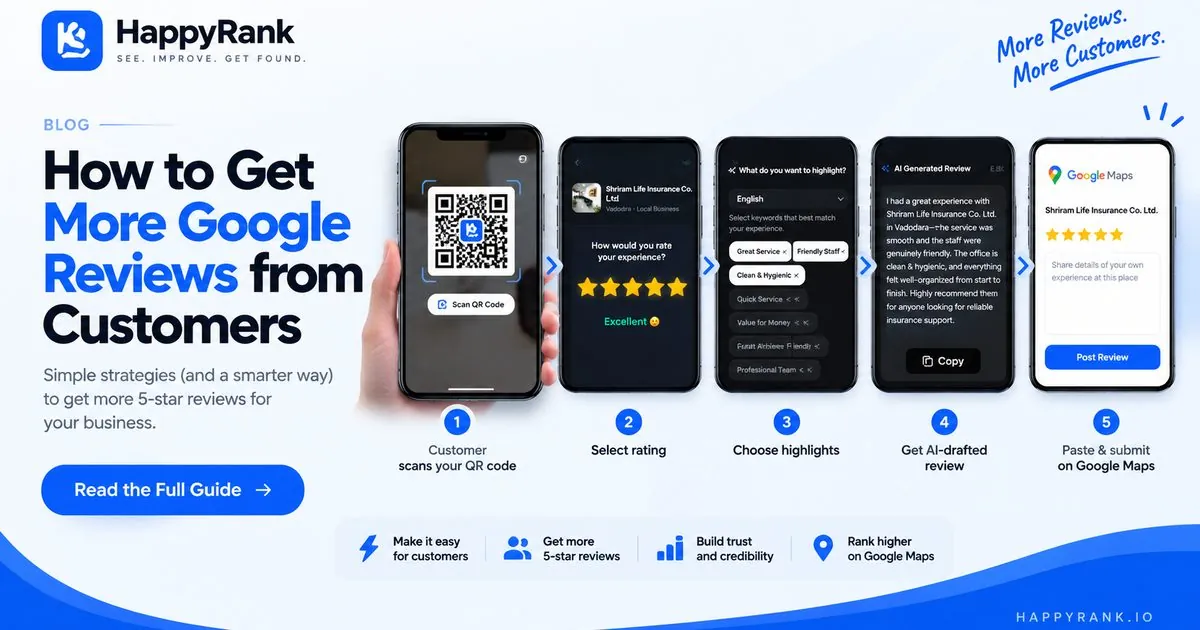
HappyRank Smart QR Reviews takes the standard QR code idea one step further. Instead of dropping customers on a blank review form, it walks them through a short guided flow with an AI Review Writer that drafts the review for them. Here is the flow as the customer experiences it:
Step 1 — Customer scans the QR code. The customer points their phone camera at your Smart QR code — on the counter, table, receipt, or card — and taps to open your review landing page. No app to install, no account to create, no searching for your business.
Step 2 — Customer selects their rating. The customer picks a star rating reflecting their experience. This keeps the process honest from the start: the rating is theirs, chosen before any text is drafted.
Step 3 — Customer chooses what to highlight. Next, the customer selects highlights — the things that stood out about their visit, such as friendly service, fast turnaround, or quality of work. This replaces the hardest part of reviewing with a simple tap.
Step 4 — AI generates a review draft. Based on the rating and highlights, the AI Review Writer drafts a review the customer can use as a starting point. This is a draft, not a finished review: the customer should read it, edit it, and make sure the final text reflects their genuine experience before posting. The AI removes writer's block; the opinion stays 100 percent the customer's.
Step 5 — Customer submits the review on Google Maps. The customer copies the draft with one tap, opens your Google Maps review form, pastes it edited as they like, and submits. The review is posted by the customer, from their own Google account, in their own words.
Businesses can also download print-ready QR assets — countertop stands, window stickers, and table tents with custom branding — so the code looks like part of your shop, not an afterthought.
HappyRank Smart QR Reviews vs Traditional Review Requests
The pattern is straightforward: verbal asks and links solve awareness, plain QR codes solve navigation, and a guided flow with an AI draft solves the writing problem on top of both.
| Method | Customer effort | Writing help | QR flow | AI draft | Best use case |
|---|---|---|---|---|---|
| Asking verbally | Low to ask, high to complete | None — blank review box | No | No | Loyal regulars who need only a nudge |
| SMS or email request | Low — tap a link | None — blank review box | Link instead of code | No | Follow-ups a day after the visit |
| Plain QR code | Low — scan and go | None — blank review box | Yes | No | High-traffic spots where finding the profile is the barrier |
| HappyRank Smart QR Reviews | Low — scan, tap, copy, post | Yes — highlights plus draft | Yes | Yes — editable draft | Any business where customers stall on what to write |
Use Cases for Smart QR Reviews
Restaurants. Ask with the check, after clearing dessert, while guests are happy and still seated. Use table tents and the check presenter with a line like Loved your meal? Scan, tap, done. Diners rarely know what to write beyond good food — choosing highlights turns a vague impulse into a specific review before they leave.
Clinics and healthcare-related local businesses. Ask at checkout after a smooth appointment — never in the treatment room, never when a patient is unwell or stressed. Place a small stand at the front desk and a code on the after-visit summary. Patients can select neutral highlights like short wait or clear explanations. Avoid any wording suggesting diagnoses or outcomes, and never pressure anyone.
Salons and beauty businesses. Ask at the mirror reveal, when the client is visibly delighted. Hand over a branded card with the stylist's name plus a mirror-side stand. Beauty reviews persuade when specific, and highlights prompt that specificity while the client is still in the chair.
Home services: plumbers, electricians, cleaners. Ask after the walkthrough, once the customer confirms everything works. Put the code on the invoice and a leave-behind card, and have field staff point to it. A card the customer keeps plus a one-tap draft means the review happens that evening instead of never. See also our local SEO guide for plumbers.
Retail stores. Ask in the bag-stuffing moment at checkout, when the interaction has been friendly and unhurried. Use a counter stand at the register and a sticker on the bag, plus exit signage for browsers. Retail visits are brief, so a scan-and-tap flow fits a window that a search-us-later request does not.
SEO agencies managing local business clients. Agencies do not ask the end customer directly — they build the moment into each client's operations during onboarding. One QR setup per location keeps multi-location clients consistent, and staff training plus printed assets plus a guided customer flow becomes a deliverable, not just advice.
How SEO Agencies Can Use QR-Based Review Collection
For agencies, review collection is a service line, not a suggestion. Fold it into client work like this:
- Client onboarding. Add review collection to the setup checklist alongside profile optimization (see our 12-point GBP checklist). Generate the QR assets, confirm the review destination is correct, and test the full scan-to-submit flow before launch.
- Review acquisition workflows. Define per client: the ask moment, the exact staff script, QR placement, and one follow-up message. Document it in a one-page SOP the client's team can follow.
- Staff training. A 15-minute session beats a PDF nobody reads. Role-play the ask, show staff the customer-side flow on a phone, and designate who owns the table tents and receipt codes.
- Reporting. Track review count, average rating, and response rate per location month over month. Tools like geo-grid tracking and GBP sync help report visibility alongside reputation.
- Multi-location businesses. Standardize everything: same QR design system, same scripts, same follow-up timing — customized only for location-specific details. Consistency is what makes five locations manageable and fifty possible.
Only promise clients what the product actually does. Smart QR provides the guided QR experience and print-ready assets described above; campaign results depend on each business's volume and execution.
How to Ask for Reviews Without Sounding Pushy
The golden rule: ask happy customers for feedback, make it optional, and thank them either way. Adapt these starting points to your tone:
- In person: I am really glad we could sort that out for you today. If you have 30 seconds, scanning this code and sharing a few words on Google would mean a lot to our team — and if anything was not right, please tell me now so I can fix it.
- SMS: Hi [Name], thanks for visiting [Business] today! If you were happy with your visit, we would appreciate a quick Google review: [link]. Takes under a minute. — [Your name], [Business]
- Email: Subject: How was your visit, [Name]? Two sentences of thanks, one sentence explaining the review takes under a minute and helps a local business, one clear button. Sign with a person's name, not The Team.
- Receipt or signage: Enjoyed your visit? Scan to review us on Google — 30 seconds, no account needed to start. Thank you for supporting local!
- QR call to action next to the code: Love your meal, haircut, or repair? Scan, tap your highlights, post. Thank you!
Two details make these work: the time estimate (30 seconds) lowers resistance, and offering to fix problems first means you hear complaints privately before they become public reviews.
What NOT to Do When Asking for Google Reviews
Shortcuts can cost you your review stream — or your profile. Google treats fake or incentivized reviews seriously, including possible restrictions on profiles that violate its Fake Engagement policy. Stay on the right side of these lines:
- Fake reviews. Never write, buy, or plant reviews. Only genuine customers describing real experiences belong on your profile. Google's prohibited and restricted content policy is the authoritative reference.
- Reviews from non-customers. Do not ask friends, family, or staff to pose as customers — and do not review your own business or competitors.
- Misleading incentives. Discounts, gifts, or contests tied to leaving a review — especially a positive review — violate Google's policies. The safest posture is no strings attached.
- Review gating. Do not filter customers so only happy ones get the review link while unhappy ones are diverted elsewhere. Ask everyone; fix problems privately when they surface.
- Posting on behalf of customers. Never write or submit a review from a customer's device or account, even with permission. The customer must choose the rating, approve the words, and press submit themselves.
“When in doubt, check Google's official guidance on getting reviews and the content policies linked above — not random forum advice.”
Smart QR Reviews vs Just Using a Normal Google Review QR Code
A normal Google review QR code and a Smart QR code look identical on the counter. The difference is what happens after the scan: a normal code removes the navigation friction, while a guided flow also removes the writing friction — which, for most customers, is the bigger barrier.
| Aspect | Normal Google review QR code | HappyRank Smart QR Reviews |
|---|---|---|
| Where the scan leads | Straight to the Google review form | A guided landing page first, then Google Maps |
| Help choosing a rating | Google's standard form | Structured rating selection up front |
| Help deciding what to say | None — blank box | Highlight selection prompts specific topics |
| Writing assistance | None | AI-generated editable draft with one-tap copy |
| Print assets | You design your own | Ready-to-print stands, stickers, and table tents |
| Best for | Customers who already know what they will write | Customers who need help putting words together |
How to Build a Simple Review Collection System
Do not try to do everything at once. Work this list in order over two to four weeks:
- 1. Create the review destination. Claim and complete your Google Business Profile, and generate your review link or QR code following Google's instructions. Test it on your own phone first.
- 2. Identify the best customer moment. When exactly is the customer happiest? Write it down. That moment is when the ask happens.
- 3. Add QR access. Place codes where that moment occurs — counter, table, invoice, card. With Smart QR Reviews, generate the branded print assets for those spots.
- 4. Train staff. Give the team the exact script, the exact moment, and permission to skip the ask when the experience clearly was not good.
- 5. Follow up appropriately. One SMS or email to recent happy customers who have not reviewed. One message, friendly tone, clear link.
- 6. Monitor incoming reviews. Check new reviews at least weekly so you can thank reviewers and catch problems early — our local SEO audit checklist includes a simple monitoring routine.
- 7. Respond consistently. Reply to every review within days: short, specific, human. See the AI-assisted reply workflow for keeping a 100 percent response rate sustainable.
- 8. Improve the process. Monthly, ask: how many reviews did we earn, where did customers stall, which location or team member does it best? Adjust placement, wording, or timing based on what you see.
Make Every Happy Customer Count
Most businesses do not have a review problem — they have a friction problem. Customers willing to praise you stall on finding the right page or facing a blank box, and the moment passes. Fix the moment: ask personally, point a QR code at the exact destination, and give customers a starting draft they can edit into their own words. That combination is what HappyRank Smart QR Reviews is built for — scan, rate, highlight, draft, copy, and post on Google Maps. Explore the feature, print your first QR stand, and turn this week's happy customers into next week's social proof. For the full picture, start with the [HappyRank homepage](/) or browse the local SEO guide.
Frequently asked questions
How do I get more Google reviews from customers?
Ask happy customers right after a good experience, give them a one-scan path via QR code, help them know what to write, send one polite follow-up, and respond to every review you receive.
Do QR codes help businesses get reviews?
Yes. A QR code removes the finding-your-profile friction by taking customers straight to your review destination. Pair it with a personal ask and a clear call to action for best results.
What should I say when asking for a Google review?
Keep it personal, specific, and optional: mention what went well, say it takes under a minute, and thank them regardless. For example: scanning this code and sharing a few words on Google would mean a lot to our team.
Can customers edit an AI-generated review?
With HappyRank Smart QR Reviews, yes. The AI output is a draft the customer should read, edit so it reflects their genuine experience, and only then copy and submit on Google Maps.
Can I use a QR code for Google reviews?
Yes. Google explains how to share your review link and QR code directly from your Business Profile, and guided tools like Smart QR Reviews build a review-writing flow on top of that.
Is it okay to ask every customer for a review?
Yes. Asking every customer is preferable to cherry-picking only happy ones, which Google considers review gating. Keep the ask polite, optional, and timed to a natural moment.
Can agencies use QR-based review collection for clients?
Yes. Agencies can standardize the QR setup, staff scripts, placement, and follow-up timing into a repeatable process per client and location, then report on review count, rating, and response rate monthly.
How can I make it easier for customers to write reviews?
Remove the two biggest barriers: navigation with a QR code straight to the form, and writer's block with highlights to choose plus an editable AI-generated draft the customer adjusts before posting.