
How Google Maps Helps Restaurants Attract Nearby Diners
Google Maps helps restaurants attract nearby diners by showing them in local searches like 'restaurants near me' with hours, menus, photos and reviews. To get chosen, keep your Google Business Profile accurate, pick the most specific cuisine category, add real food and interior photos, link your menu and reservations, encourage genuine reviews and reply to them.
When people search for a place to eat, Google Maps is often one of the first places they turn to. Whether they are looking for a quick lunch, a cozy cafe, or a restaurant for dinner, they want nearby restaurants with good reviews, accurate details, and appealing food photos. For restaurant owners, this creates an opportunity to connect with potential customers right when they are deciding where to eat. With an optimized Google Business Profile and a strong local SEO strategy, restaurants can improve their Google Maps visibility, appear in relevant local restaurant searches, and build trust with potential diners. Tools like Happy Rank can help businesses monitor local search performance and understand how visible they are to nearby customers. From keeping menus updated to responding to customer reviews, small improvements can make it easier for people to discover a restaurant and get directions. Let's explore how Google Maps for restaurants can help attract nearby diners and turn local searches into real visits.
How Diners Discover Restaurants Through Local Searches
Google Maps for restaurants makes it easier for potential customers to discover dining options based on their location and preferences. People might search for an Italian restaurant nearby, a family-friendly cafe, or a place offering takeout. Google then displays relevant local results based on several factors, including relevance, distance, and prominence. Restaurants can benefit from these searches by maintaining accurate business information and clearly communicating what they offer. For example, a customer searching for a vegetarian restaurant is more likely to consider a business whose cuisine, menu, and other details are easy to understand. Common searches that help diners discover restaurants include:
- “Restaurants near me” when customers want convenient dining options.
- “Best pizza nearby” when they have a particular cuisine in mind.
- “Breakfast cafes near me” when looking for a specific meal.
- “Family restaurants in LA” when choosing a place for a group.
Why Google Maps Visibility Matters for Local Restaurants
Appearing in relevant Google Maps search results can introduce a restaurant to customers who might not have discovered it otherwise. This is especially useful for independent restaurants competing with established dining businesses in the same neighborhood. However, simply creating a listing does not guarantee prominent placement. Restaurants need an accurate Google Business Profile, relevant business categories, useful photos, and reliable customer information to help people evaluate their options. Consider a small cafe located near an office district. If its profile includes current opening hours, an updated menu, and genuine customer reviews, nearby office workers can assess whether it suits their lunch plans without visiting multiple websites.
Turning Nearby Searches Into Restaurant Visits
Google Maps helps diners move from discovery to action by providing useful information in one place. Customers can check the restaurant's location, call to ask a question, visit its website, or request directions. To make the most of this opportunity, restaurant owners should focus on:
- Keeping contact details and opening hours accurate.
- Adding clear, recent photos of food and the dining space.
- Making menus and reservation information easy to access.
- Responding professionally to customer reviews.
The goal is not just to appear in a search. It is to give potential diners enough relevant information and confidence to choose your restaurant over other nearby options.
Optimize Your Google Business Profile to Attract More Diners
Your Google Business Profile is one of the most important tools for presenting your restaurant on Google Search and Google Maps. It gives potential diners a quick overview of your business before they decide whether to visit. An incomplete or outdated profile can leave customers with unanswered questions, while an informative listing makes it easier for them to plan their visit.
Complete Your Restaurant's Business Information
Start by checking that your restaurant's essential details are accurate. These include your business name, address, phone number, website, and operating hours. If customers arrive expecting your restaurant to be open and find the doors locked, it can damage their experience and trust. Pay particular attention to holiday hours, temporary closures, and changes to your location or contact details. Consistent information across your website and other reputable business directories also helps customers find the correct details.
Choose the Right Business Categories and Attributes
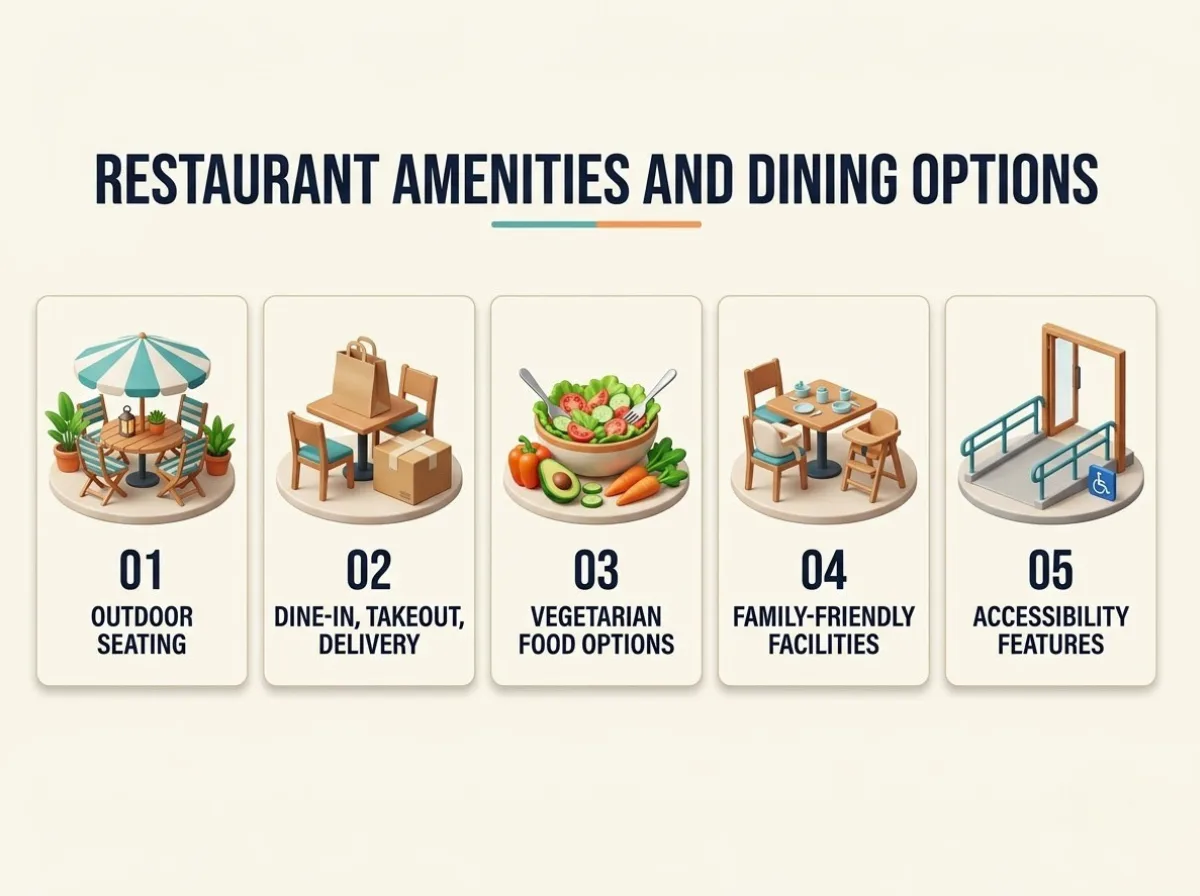
Your primary business category should accurately describe your restaurant's main offering. For example, a sushi restaurant should select the most appropriate available category rather than relying on a broad category that does not communicate its specialty. You can also add relevant secondary categories and available attributes to describe additional offerings. Depending on your business, these might include: When updating your restaurant’s Google Business Profile, include details that help potential diners decide whether your establishment suits their needs. Highlighting your available services, dining options, and facilities gives customers a clearer idea of what to expect before they visit. Consider adding relevant details such as:
Restaurant Amenities and Dinning Options
Choose only the categories and attributes that genuinely apply. Accurate information helps customers identify whether your restaurant meets their needs.
Add Menu Details, Food Photos, and Booking Options
Food is a major part of the decision-making process, so make your menu and images work for you. Upload clear photographs of popular dishes, the interior, outdoor seating, and other features that reflect the actual dining experience. Where supported, include links to your menu, reservation service, or online ordering platform. Keep prices, dish descriptions, and availability updated so customers know what to expect.
Keep Your Profile Updated and Engaging
A restaurant's offerings can change with the season, so your profile should reflect those changes. Update menu links, special opening hours, and relevant announcements when needed. Use this simple checklist to maintain your listing:
- Review business information regularly.
- Replace outdated photos with current ones.
- Check that menu and reservation links work.
- Update special hours before holidays.
- Review customer questions and feedback.
A well-maintained profile supports a smoother customer journey. It helps diners find the information they need and gives them a clearer reason to consider your restaurant.
Use Reviews, Ratings, and Photos to Build Trust
When diners compare restaurants on Google Maps, they rarely look at location alone. They also want to know whether the food is good, the service is reliable, and the atmosphere matches what they are looking for. This is where Google reviews, customer ratings, and restaurant photos become important. Together, they help potential customers form an impression before they walk through your door.
Encourage Genuine Customer Reviews
Customer feedback gives people a better understanding of what to expect from your restaurant. Positive experiences shared by real customers can strengthen your reputation, while detailed reviews can answer questions that your business profile might not cover. Make it easy for customers to leave feedback by sharing your Google review link after a visit or displaying a review QR code at the counter. Train staff to invite feedback naturally without pressuring customers. A few practical ways to encourage reviews include:
- Add a review link to follow-up emails or messages.
- Display a QR code where customers can easily scan it.
- Invite customers to share honest feedback after their visit.
- Ask for feedback consistently rather than only when a review is needed.
Avoid offering incentives in exchange for positive reviews. Google's policies prohibit incentivized reviews, and your goal should be to collect genuine feedback that reflects real customer experiences.
Respond to Positive and Negative Reviews
Responding to reviews shows that your restaurant pays attention to customer experiences. Thank customers for specific compliments, such as friendly service or a favorite dish, rather than using the same generic response every time. Negative reviews also provide an opportunity to demonstrate professionalism. Acknowledge the customer's concern, respond calmly, and explain how they can contact you to discuss the issue further. If several customers mention slow service or inconsistent food quality, use that feedback to identify areas for improvement.
Use Restaurant Photos to Influence Dining Decisions
High-quality images help customers imagine what visiting your restaurant will be like. Include photographs of signature dishes, the dining area, outdoor seating, and the overall atmosphere. Focus on images that accurately represent your business. Avoid relying entirely on heavily edited promotional photographs that create unrealistic expectations.
| Photo type | What it helps diners understand |
|---|---|
| Signature dishes | Food presentation and menu variety |
| Interior photos | Seating, decor, and ambiance |
| Exterior photos | What to look for when arriving |
| Outdoor seating | Available dining arrangements |
| Group dining areas | Whether the space suits gatherings |
An informative profile, authentic reviews, and recent photos work together to reduce uncertainty. Although good ratings do not guarantee a visit, they can help diners feel more confident when comparing nearby options.
Improve Local SEO to Increase Google Maps Visibility
Getting your restaurant noticed on Google Maps involves more than creating a business listing. A strong local SEO strategy for restaurants helps Google understand what your business offers and helps customers find relevant information online. While no restaurant can guarantee a particular ranking, consistent optimization can improve the quality of its online presence.
Understand Local Ranking Factors
Google's local results primarily consider relevance, distance, and prominence.
- Relevance: How well your restaurant matches what someone searches for.
- Distance: How far your restaurant is from the searcher or the location specified in the search.
- Prominence: How well known your business appears to be, based on available information such as links, reviews, and other signals.
These factors explain why a restaurant may appear prominently for one search but not another. Distance is especially important, so even a well-optimized profile cannot guarantee that your restaurant will appear at the top for every nearby search.
Use Local Keywords Naturally
Think about the words customers use when looking for food in your area. These might include cuisine types, neighborhood names, popular dishes, or dining preferences. For example, a restaurant in Austin might create website content around phrases such as “Italian restaurant in Austin” or “family-friendly dining in downtown Austin.” Use relevant terms naturally in website pages, menu descriptions, and location-specific content. Avoid keyword stuffing or adding extra keywords to your business name when they are not part of its real-world name.
Strengthen Local Citations and Website Signals
Your restaurant's website should support the information on your Google Business Profile. Create a useful location page with your address, opening hours, menu, contact details, and directions. You should also check your business details on relevant online directories. Consistent information makes it easier for customers to identify the correct location and contact your restaurant. A mobile-friendly website is equally important because many diners search while traveling or making immediate dining plans.
Track Google Maps Performance and Customer Actions
Regularly reviewing performance helps you understand whether your efforts are making a difference. Google Business Profile performance data can provide insights into how people discover and interact with your listing. Useful metrics include:
- Search terms: What people searched for before finding your profile, where available.
- Calls: How often customers use the call option.
- Website clicks: How many people visit your website from the profile.
- Direction requests: How often people request directions to your location.
Tools such as Happy Rank can also support local search visibility monitoring, helping businesses understand their local search performance. Review these metrics over time instead of focusing on a single ranking. The goal is to identify opportunities to improve visibility and make it easier for potential diners to choose your restaurant.
Turn Google Maps Visibility Into More Restaurant Customers
Appearing in Google Maps results is a valuable first step, but visibility alone does not guarantee more reservations or sales. Restaurant owners also need to make it easy for customers to take the next step. From checking the menu to requesting directions, every interaction should help diners move closer to visiting.
Make It Easy for Diners to Take the Next Step
Imagine someone searching for a restaurant while deciding where to have dinner. They find your listing, but the opening hours are outdated and the menu link does not work. Even if your restaurant is a good match, the customer may choose another option. To prevent this, keep essential details current and easy to access.
- Check that your phone number, address, and opening hours are correct.
- Make sure menu and reservation links work on mobile devices.
- Update holiday hours and temporary closures promptly.
- Provide clear information about dining, takeout, and delivery options.
- Respond to relevant questions and customer feedback.
These improvements reduce unnecessary friction and help diners make informed decisions.
Use a Simple Monthly Google Maps Improvement Plan
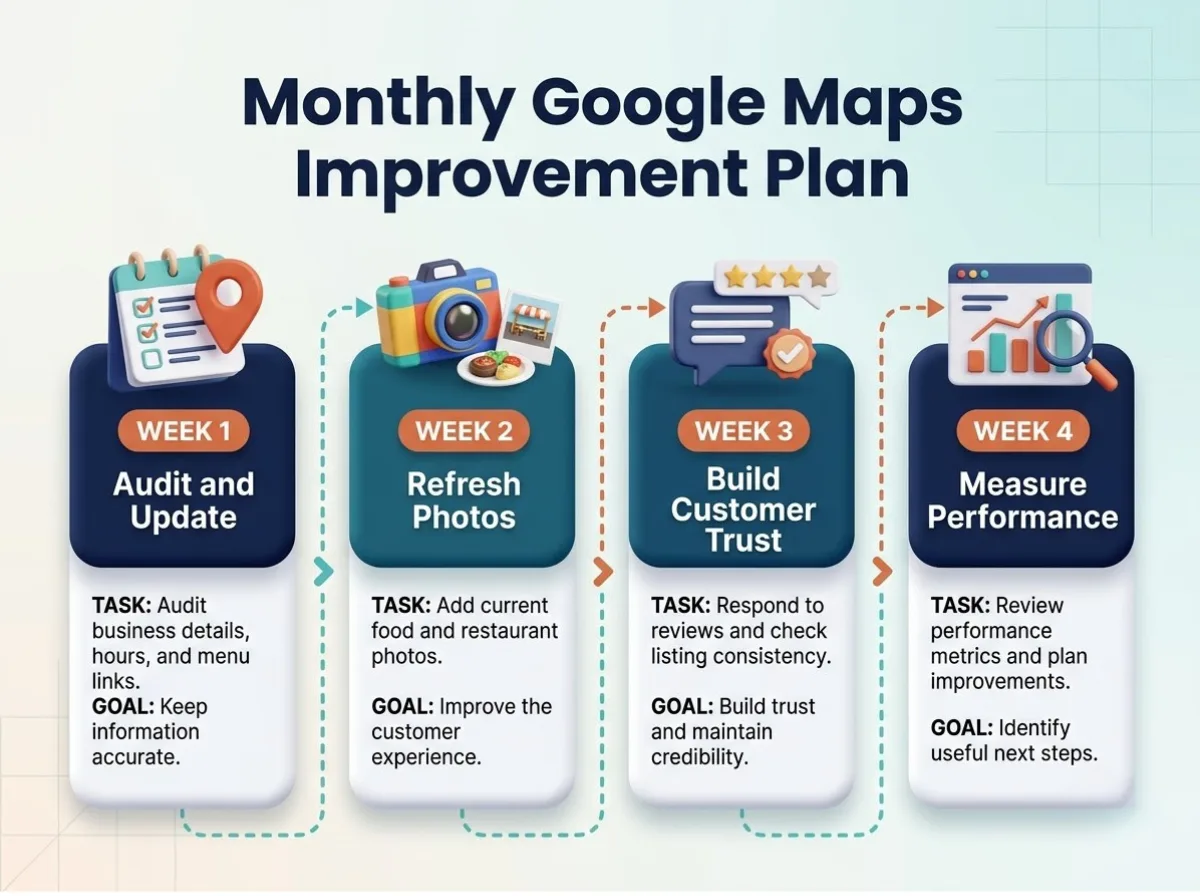
You do not need to change everything at once. A consistent monthly routine can help you maintain your profile and identify areas that need attention. Repeat this process each month, adjusting your priorities based on customer feedback and performance trends.
Monthly google maps improvement plan
Improving your restaurant’s presence on Google Maps is an ongoing process, not a one-time task. Setting aside time each week helps you keep your listing relevant, strengthen customer confidence, and spot areas that need attention. A simple monthly routine can make these improvements easier to manage while helping you focus on the changes that matter most to potential diners.
Measure Results Beyond Rankings
A higher position in local search results can be encouraging, but it should not be your only measure of success. Look at customer actions and business outcomes together. For example, more direction requests may indicate growing interest, while reservation records and order data can help you understand whether that interest translates into actual visits and sales. Compare performance across similar periods, especially when seasonal demand or local events influence restaurant traffic. You can also ask new customers how they discovered your business. Ultimately, the aim of Google Maps marketing for restaurants is to connect with people who are likely to visit, give them accurate information, and make choosing your restaurant easier. By maintaining your profile, responding to feedback, and reviewing results regularly, you can build a stronger local presence and create more opportunities to attract nearby diners.
Conclusion
Attracting nearby diners starts with making your restaurant easy to discover online. Google Maps for restaurants offers a valuable way to connect with people searching for dining options in their area. By optimizing your Google Business Profile, maintaining accurate business information, sharing appealing food photos, and encouraging genuine Google reviews, you can build trust and improve your local search visibility. However, attracting customers requires ongoing effort. Regularly updating your menu, responding to feedback, and monitoring Google Maps performance can help you identify opportunities to improve your restaurant's online presence. Tools like Happy Rank can support your local SEO efforts by helping you monitor search visibility and understand your performance in local results. Start by reviewing your restaurant's Google Maps listing and correcting any outdated information. Consistent improvements can make it easier for potential customers to discover your restaurant, explore your offerings, and choose your business for their next meal.
Frequently asked questions
How do restaurants show up on Google Maps?
Through a Google Business Profile. Google ranks local results by relevance, distance and prominence, so an accurate profile with the right categories, useful photos and genuine reviews helps, though no one can guarantee top placement for every nearby search.
What category should a restaurant choose on Google Business Profile?
The most specific category for your main offering, such as a sushi restaurant category rather than a broad one. Add secondary categories and attributes only when they genuinely apply.
What photos should a restaurant add to Google Maps?
Signature dishes, the interior, the exterior, outdoor seating and group dining areas. Use recent, accurate photos rather than heavily edited promotional shots that set unrealistic expectations.
How can restaurants get more Google reviews?
Share your review link in follow-up messages, display a review QR code at the counter and train staff to invite honest feedback. Don't offer incentives for positive reviews; Google's policies prohibit it.
What Google Business Profile metrics should restaurants track?
Search terms that found your profile, calls, website clicks and direction requests. Compare them with reservations and order data to see whether interest turns into visits.