
The Complete Guide to Managing Local SEO With Software
To manage local SEO with software, choose a tool with local and geo-grid rank tracking, Google Business Profile monitoring, citation management, review monitoring, competitor analysis and reporting. Then follow five steps: audit your current performance, research keywords and competitors, fix your profile and listings, monitor rankings and reviews, and use reports to decide what to improve next.
Getting your business noticed in local search can be challenging, especially when competitors are targeting the same customers. You need more than an optimized website to stand out. Accurate business listings, positive customer reviews, strong Google Maps visibility, and consistent performance tracking all play an important role. Managing these tasks manually can quickly become time-consuming, particularly when you serve multiple locations.
That is where local SEO software makes a difference. Tools like [Happy Rank](/) help businesses simplify local SEO management, monitor local search rankings, identify optimization opportunities, and understand how customers discover their services online. Instead of juggling multiple tools and spreadsheets, you can organize essential SEO activities and make more informed decisions using reliable data.
Whether you run a small local business or manage several business locations, the right local SEO tools can help improve local search visibility and create a more consistent optimization strategy. The key is knowing which features matter and how to use them effectively.
What Is Local SEO Software and Why Does It Matter?
When I think about managing local search visibility, one thing is clear: keeping track of rankings, business listings, customer reviews, and competitors manually can become overwhelming. This is especially true when a business serves multiple neighborhoods or operates from several locations. Local SEO software simplifies these tasks by bringing essential optimization tools and performance data into a more organized workflow.
Understanding Local SEO Software
Local SEO software helps businesses improve how they appear in location-based search results, including Google Search and Google Maps. Depending on the platform, it can support local keyword tracking, business listing management, review monitoring, competitor analysis, and performance reporting.
Instead of checking rankings manually or searching multiple directories for outdated information, I can use local SEO tools to identify gaps, monitor changes, and decide which tasks need attention first.
For example, imagine you run a plumbing company in Chicago. Your website may perform well for general plumbing searches but struggle to appear when nearby customers search for an emergency plumber. Local SEO software can help you monitor location-specific rankings, compare your visibility with competitors, and identify areas that need improvement.
It is important to understand that software does not automatically improve rankings. It provides the data and insights needed to make better optimization decisions.
Key Benefits of Using Local SEO Software
The real value of local SEO management tools lies in making routine tasks easier to manage while helping businesses focus on measurable improvements.
Here are some important benefits:
- Save time: Automate supported monitoring tasks and reduce repetitive manual checks.
- Track local rankings: Monitor how your business performs for relevant keywords across different locations.
- Improve business listings: Identify inconsistent business details and opportunities to strengthen your online presence.
- Monitor customer reviews: Keep track of feedback and respond more consistently across supported platforms.
- Analyze competitors: Understand where competing businesses are more visible and identify potential ranking gaps.
- Measure performance: Use reports to evaluate visibility trends and guide future SEO decisions.
For instance, I would prioritize ranking changes, listing accuracy, and review activity before spending time on less urgent tasks. This approach makes local search optimization more focused and manageable.
Who Should Use Local SEO Software?
These tools are useful for businesses that depend on customers finding them in a specific geographic area. However, the ideal features depend on the business model.
| Business type | How the software helps |
|---|---|
| Small local businesses | Monitor rankings, listings, and reviews |
| Service-area businesses | Track visibility across target neighborhoods |
| Multi-location companies | Manage and compare performance across locations |
| SEO agencies | Organize client reporting and optimization tasks |
For businesses looking to simplify these activities, Happy Rank is one option to explore for local SEO tracking and visibility management.
Ultimately, the goal is not to collect more SEO data than you need. It is to use the right information to make informed decisions, improve your local presence, and help nearby customers find your business more easily.
Essential Features to Look for in Local SEO Software
Choosing the right local SEO software starts with understanding what your business actually needs. I would not choose a platform simply because it offers dozens of features. Instead, I would focus on tools that simplify daily tasks, reveal ranking opportunities, and help measure progress. The right combination of features makes local SEO management more organized and actionable.
Local Rank Tracking and Geo-Grid Analysis
One of the first features I look for is local rank tracking software. It helps businesses monitor keyword positions and understand how their visibility changes over time. Since local search results can vary by location, checking rankings from a single point may not provide the complete picture.
Geo-grid rank tracking takes this analysis further by showing how a business performs across multiple geographic points. For example, a cleaning company might rank well near its office but struggle to appear in surrounding neighborhoods. This information helps identify areas where additional optimization may be worthwhile.
Google Business Profile Management
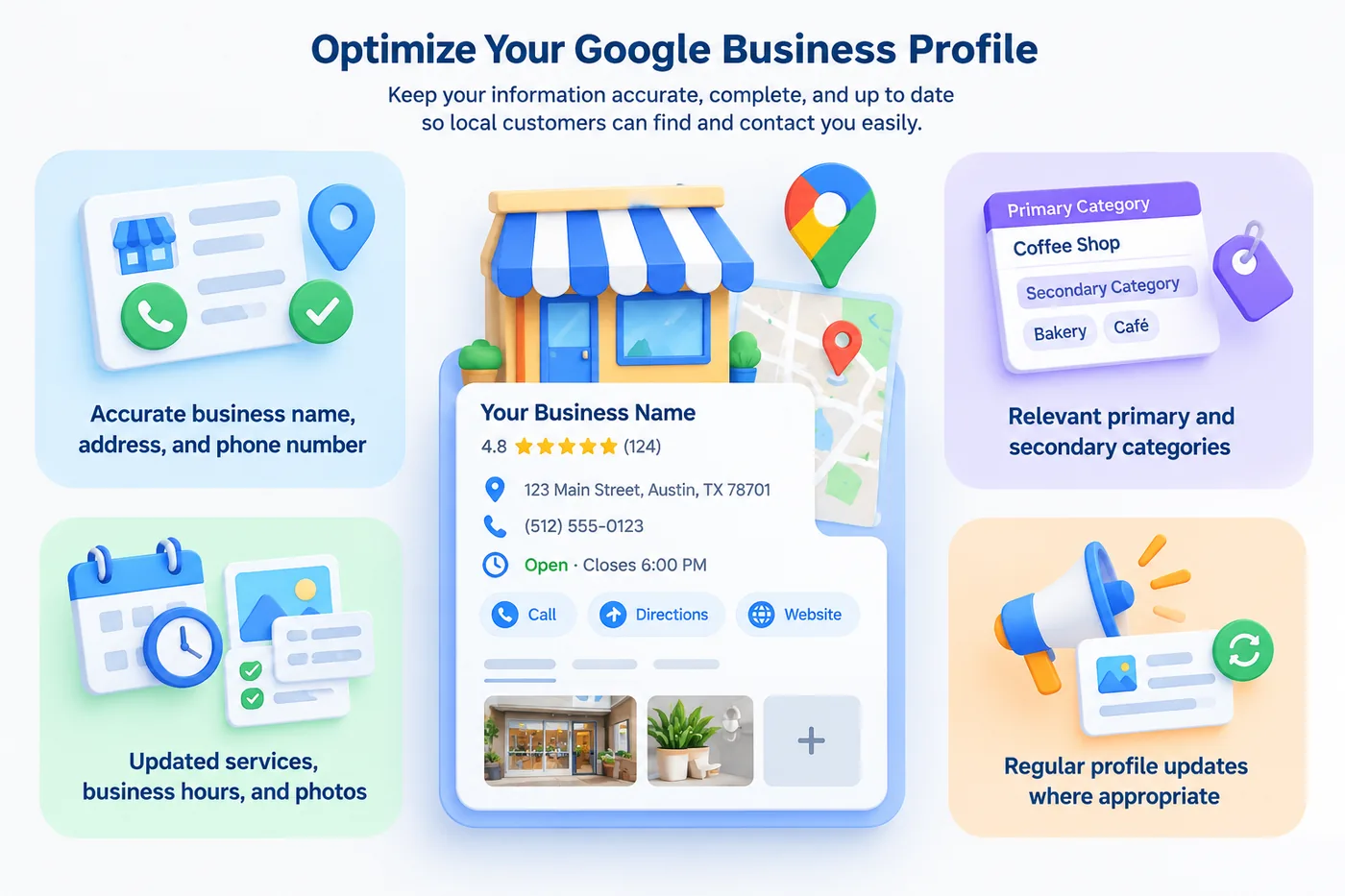
I recommend prioritizing these Google Business Profile elements:
- Business information: Keep your business name, address or service area, phone number, and operating hours accurate.
- Business categories: Choose the most relevant primary category and appropriate secondary categories.
- Services and attributes: Add accurate service details and applicable business attributes.
- Photos: Upload current, relevant images that help customers understand your business.
- Profile updates: Review your information regularly and make changes when your business details change.
An accurate and complete Google Business Profile helps customers find your business and access the information they need. Use local SEO software to monitor your business information, identify potential listing issues, and track local search performance.
Google Business Profile management features can simplify these checks, although you should still verify important changes before publishing them.
These simple steps support effective Google Business Profile optimization and help create a consistent experience for potential customers. Use local SEO software to monitor your business information, identify potential listing issues, and track local search performance. Regular updates and accurate details make it easier for customers to discover your business and take the next step, whether that means calling, visiting your website, or requesting directions.
Google Business Profile management features can make these checks easier, although businesses should still verify important changes before publishing them.
Local Citation and Listing Management
Consistent business information across online directories supports reliable local business discovery. Local citation management features help identify listing inconsistencies, duplicate records, and opportunities to improve directory coverage.
For example, if a business has an outdated phone number on a directory, potential customers may struggle to contact it. I would use listing management tools to identify these issues and prioritize corrections on important platforms.
Review Monitoring and Reputation Management
Customer feedback can influence how people evaluate a local business. Online reputation management features help businesses monitor reviews, understand recurring feedback, and maintain a consistent response process.
I would look for tools that support:
- Review monitoring across relevant platforms
- Notifications for new customer feedback
- Review trend analysis
- Efficient review response workflows
Always keep responses genuine and relevant to the customer's experience.
Competitor Analysis and SEO Reporting
Finally, local competitor analysis and local SEO reporting tools help explain where your business stands in the market. You can compare keyword visibility, identify content gaps, and track progress over time.
When evaluating a platform such as Happy Rank, I would assess its available rank tracking, visibility analysis, and reporting features against my business goals rather than assuming every tool offers the same capabilities.
Ultimately, the best software combines useful data with a workflow your team can maintain consistently.
How to Manage Local SEO With Software Step by Step
Using local SEO software effectively is about building a repeatable process, not simply checking rankings whenever you have time. I prefer breaking local SEO into manageable steps so each activity has a clear purpose. This approach helps businesses identify problems, prioritize improvements, and measure progress without wasting time on unnecessary tasks.
Step 1: Audit Your Current Local SEO Performance
Start with a local SEO audit to understand where your business stands. Review your Google Business Profile, website, business listings, keyword rankings, and customer reviews.
I recommend checking for outdated contact information, missing business details, inconsistent listings, and keywords where your visibility is weak. Use software reports to establish a baseline before making changes. This makes it easier to evaluate whether your efforts are producing meaningful improvements.
Step 2: Research Local Keywords and Competitors
Next, use local keyword research to discover the phrases customers use when searching for your services. Consider service-related searches, location modifiers, and terms that indicate a strong intention to contact a business.
For example, a landscaping company might target searches such as "lawn care services in Austin" or "landscaper near me."
Use local rank tracking and competitor analysis features to identify ranking gaps and understand which nearby businesses appear prominently in relevant searches. Prioritize keywords based on relevance to your services and potential customers, rather than targeting every available phrase.
Step 3: Optimize Your Google Business Profile and Listings
Your Google Business Profile optimization process should focus on accuracy, completeness, and relevance. Confirm your business hours, contact details, categories, services, and other important information.
I also recommend reviewing major directories to ensure your business information remains consistent. Local listing management tools can help identify discrepancies and duplicate listings that need attention.
Remember that software can flag potential issues, but you should verify the information before making corrections.
Step 4: Monitor Rankings, Reviews, and Local Visibility
Once your foundational updates are complete, use local SEO tracking tools to monitor changes over time. Check keyword rankings across relevant locations, review customer feedback, and monitor available Google Business Profile performance data.
Pay attention to:
- Local search rankings for priority keywords
- Google Maps visibility across target neighborhoods
- New customer reviews and response activity
- Available calls, website clicks, and direction requests
These signals help you understand whether your business is becoming easier for local customers to discover.
Step 5: Analyze Reports and Improve Your Strategy
Finally, use local SEO analytics to decide what to improve next. Compare current performance with your baseline, identify persistent weaknesses, and prioritize changes that support your business goals.
For example, if rankings improve but customer inquiries remain low, review your website content, service pages, and contact options. A platform such as Happy Rank can be considered as part of your workflow for local visibility monitoring, depending on the features available in your plan.
The key is to turn data into action. Consistent monitoring, thoughtful adjustments, and regular performance reviews make local SEO management more effective over time.
Common Local SEO Software Mistakes and How to Avoid Them
Using local SEO software can make optimization easier, but the results depend on how you interpret and apply the information. I have found that businesses can waste time and resources when they focus on the wrong metrics, overlook data accuracy, or rely too heavily on automation. Avoiding these common mistakes helps make local SEO management more practical and effective.
Focusing Only on Rankings
One common mistake is treating higher keyword rankings as the only measure of success. While local search rankings and Google Maps visibility matter, they do not tell you everything about your business performance.
For example, a business might rank well for a local keyword but receive few calls or website visits. This could indicate that its website content, service information, or contact options need improvement.
I recommend monitoring several local SEO metrics, including:
- Local keyword rankings and visibility trends
- Website traffic from local searches
- Calls and direction requests, where tracking is available
- Customer reviews and engagement
- Qualified leads and conversions
Looking at these metrics together provides a more complete picture of your local search performance.
Ignoring Data Accuracy and Business Listings
Inaccurate business information can confuse potential customers and make it harder for them to contact you. Outdated phone numbers, incorrect opening hours, and duplicate listings are common issues that deserve attention.
Local citation management and listing monitoring features can help identify inconsistencies, but I would never assume every automated suggestion is correct.
To avoid this problem, regularly verify your business name, address, phone number, hours, and other important details across major directories. Pay particular attention to changes following a relocation or business update.
Automating Tasks Without Reviewing Results
Automation can save time, but it should not replace human judgment. Local SEO tools may highlight ranking changes, identify listing problems, or provide optimization recommendations. However, these insights still require context.
For example, a temporary ranking decline does not necessarily mean your entire SEO strategy has failed. Local results can fluctuate because of competition, location, search intent, and other factors.
I recommend reviewing significant changes before making major adjustments. Similarly, keep customer review responses accurate, professional, and personalized rather than relying on generic automated messages.
Choosing Tools With Unnecessary Features
Another mistake is paying for features that do not support your actual goals. More functionality does not automatically mean better results.
When evaluating local SEO software, I would compare tools based on the following criteria:
- Ease of use: Can your team manage routine tasks efficiently?
- Relevant features: Does the platform support your most important SEO activities?
- Reporting: Can you understand performance without complicated analysis?
- Scalability: Will the tool support additional locations or clients?
- Pricing: Does the value justify the ongoing cost?
Platforms such as Happy Rank are worth evaluating against these requirements, with specific features verified before choosing a plan.
Ultimately, the best local SEO strategy combines reliable software, accurate information, and consistent human oversight. The goal is to make better decisions, not simply automate more tasks.
How to Measure Results and Build a Long-Term Local SEO Workflow
Managing local search effectively requires more than making occasional updates. I believe the best approach is to measure performance consistently, review the data, and turn insights into practical improvements. With the right local SEO software, businesses can establish a repeatable process that supports long-term growth rather than relying on guesswork.
Track the Right Local SEO Metrics
The first step is identifying which local SEO metrics matter most to your business. Rankings are useful, but they should be considered alongside customer engagement and business outcomes.
The first step is identifying which local SEO metrics matter most to your business. Rankings are useful, but they should be considered alongside customer engagement and business outcomes.
I recommend monitoring these key performance indicators:
- Local keyword rankings: Track positions for important service and location-based searches.
- Google Maps visibility: Review how your business appears across target neighborhoods.
- Website traffic: Monitor relevant visits from organic and local search.
- Customer actions: Track available calls, website clicks, and direction requests.
- Reviews and reputation: Monitor new reviews, recurring feedback, and response activity.
- Leads and conversions: Measure qualified inquiries, bookings, or other meaningful business outcomes.
Review these metrics together rather than treating any single number as proof of success. If rankings improve but inquiries remain low, investigate your website experience, service pages, and contact options.
Using local SEO analytics consistently helps you identify performance gaps, prioritize improvements, and understand whether your optimization efforts are contributing to meaningful business results.
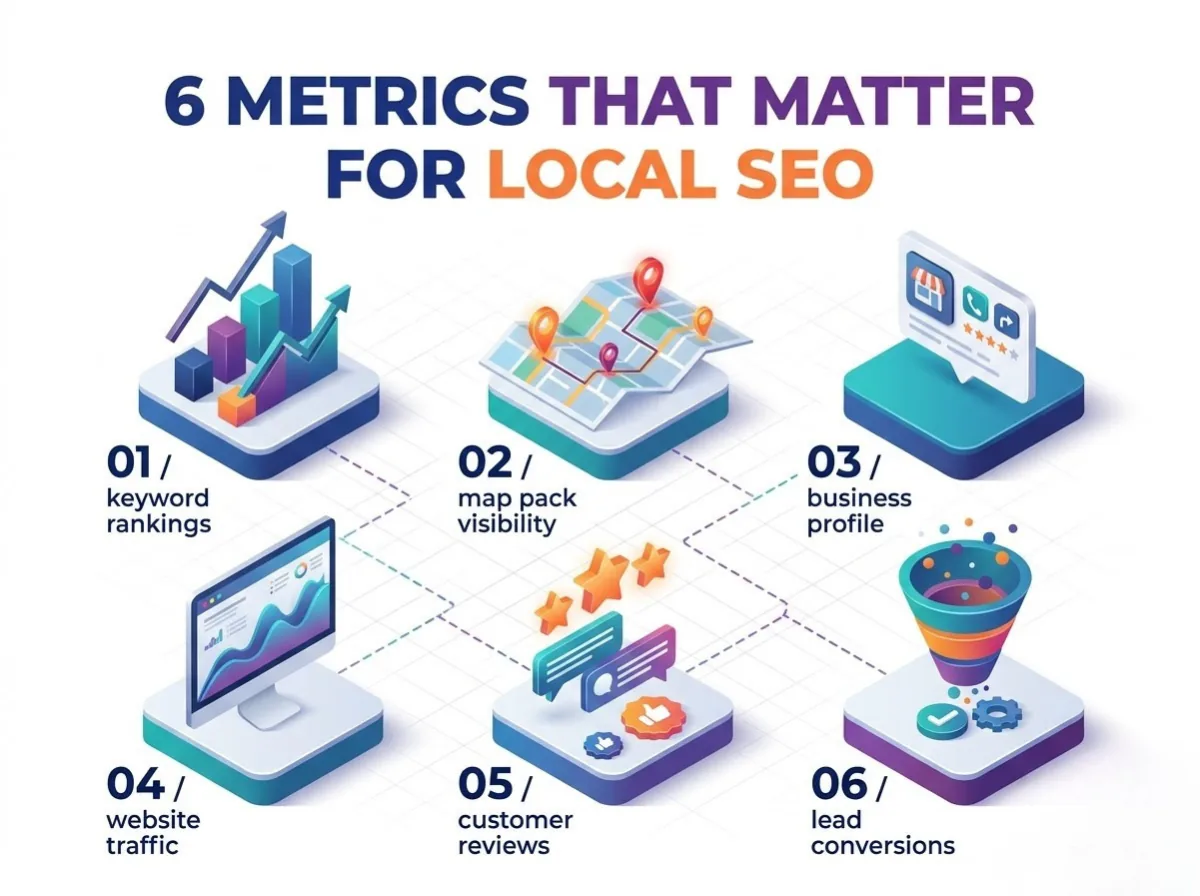
Using local SEO analytics to review these metrics together helps you understand which activities contribute to meaningful results. For example, improved rankings alongside increased qualified inquiries provide stronger evidence of progress than ranking changes alone.
Create a Consistent Monitoring Schedule
A practical local SEO tracking routine prevents important issues from going unnoticed. Instead of checking every metric daily, I prefer organizing tasks by frequency and importance.
| Frequency | Recommended activities |
|---|---|
| Weekly | Check ranking changes, new reviews, and urgent listing issues |
| Monthly | Review performance reports, keyword trends, and competitor activity |
| Quarterly | Reassess target keywords, business goals, and optimization priorities |
This schedule is a starting point, not a rigid rule. Businesses operating in competitive markets or managing multiple locations may need more frequent monitoring.
Turn Insights Into Actionable Improvements
Collecting data is only useful when you act on it. I recommend reviewing your reports regularly and identifying the issues most likely to affect customers and business performance.
For example, if your local search visibility is weak in a particular neighborhood, investigate your location-specific rankings, service pages, competitor presence, and business information. If customer interactions increase but inquiries remain low, review your website's contact options and conversion process.
Tools such as Happy Rank can be considered as part of a local SEO management workflow, depending on the available features and reporting capabilities. The important thing is to choose tools that help you identify opportunities and monitor changes consistently.
Finally, document the improvements you make and compare subsequent results with your original baseline. This creates a clearer picture of what works, what needs adjustment, and where to focus your next efforts. Over time, a consistent local SEO strategy helps your business make informed decisions, maintain accurate information, and build stronger visibility in local search.
Conclusion
Managing local search visibility becomes easier when you combine the right tools with a consistent strategy. Local SEO software helps businesses monitor rankings, maintain accurate listings, track customer reviews, and identify opportunities to improve their online presence. However, real progress comes from using these insights to make informed decisions and refine your optimization efforts.
Whether you run a small business, manage a service-area company, or oversee multiple locations, a structured approach to local SEO management can save time and improve efficiency. Tools like Happy Rank are worth exploring if you want to simplify local rank tracking and better understand your local search performance. Evaluate the available features against your business goals before choosing a solution.
Start by auditing your current performance, fixing the most important issues, and tracking meaningful metrics consistently. With regular monitoring and practical improvements, you can strengthen your local search visibility, reach more nearby customers, and build a stronger foundation for long-term growth.
Frequently asked questions
What features should local SEO software have?
Local rank tracking with geo-grid analysis, Google Business Profile management, citation and listing management, review monitoring, competitor analysis and clear reporting. Choose based on the tasks your team actually needs, not the longest feature list.
Who should use local SEO software?
Small local businesses tracking rankings, listings and reviews; service-area businesses monitoring visibility across neighborhoods; multi-location companies comparing branches; and SEO agencies organizing client reporting.
How do I manage local SEO with software step by step?
Audit your profile, website, listings, rankings and reviews to set a baseline; research local keywords and competitors; optimize your Google Business Profile and listings; monitor rankings, reviews and customer actions; then analyze reports and refine your strategy.
How often should I check local SEO software reports?
Weekly for ranking changes, new reviews and urgent listing issues; monthly for performance reports, keyword trends and competitors; and quarterly to reassess target keywords and priorities.
What are common mistakes when using local SEO software?
Focusing only on rankings, trusting automated listing suggestions without verifying them, reacting to every temporary ranking dip, sending generic automated review replies, and paying for features you don't need.